Service Business Forms · Aug 3, 2026 · 15 min read
Dog Grooming, Dog Walking, or Pet Sitting Forms? Choose the Right Pet-Service Template
A practical comparison of grooming client cards, mobile grooming records, dog-walking visit forms, and pet-sitting logs so you can match the download to the service you actually provide.
Start with the service handoff, not the phrase pet forms
Dog groomers, mobile groomers, dog walkers, and pet sitters all collect some of the same basic details, but they do not use those details in the same way. A grooming appointment may end with updated service notes and a report card. A scheduled walk may need a visit record and a clear access handoff. A pet-sitting assignment may involve several visits, owner instructions, emergency contacts, and updates over a longer period. Buying a general pet form because the cover looks relevant can leave the most important step unsupported.
Before comparing products, write one sentence that begins with: After this service, I need to hand off or update ____. Fill the blank with the real output: a grooming report card, a current appointment note, a walk report, an owner update, a route record, or a visit log. That answer narrows the choice faster than counting pages. It also helps you avoid buying two downloads that organize the same information in slightly different layouts.
- Name the primary service: salon grooming, mobile grooming, scheduled walks, or pet sitting.
- Identify the record that changes after every appointment or visit.
- Decide whether the most important output is internal, client-facing, or both.
- Choose the smallest complete kit that follows that real sequence.
Use this quick comparison before opening the product pages
Each current SteadyStackStudio pet-service download has a different center of gravity. Use the comparison below as a first filter, then confirm the latest file list and previews on the individual product page.
- Choose the Dog Grooming Client Card Template when fixed grooming appointments, grooming preferences, appointment notes, and printable or editable report cards are the main job.
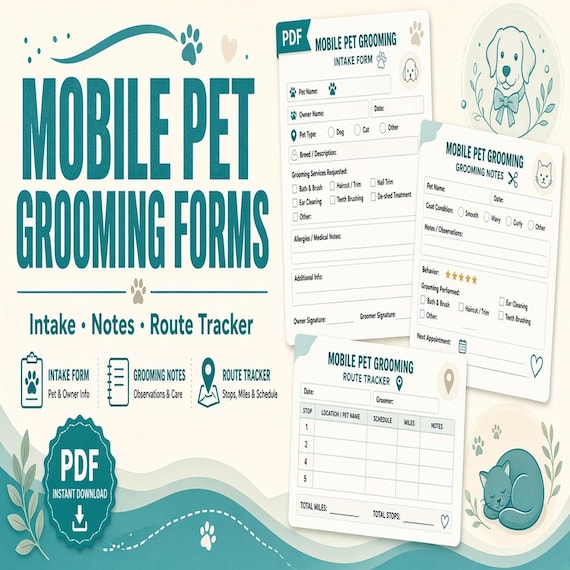
- Choose the Mobile Pet Grooming Client Record Kit when grooming records must sit beside client and pet profiles, appointments, routes, service history, follow-up, incidents, and a supply tracker.
- Choose the Dog Walking Client and Visit Forms Kit when onboarding, meet-and-greet notes, route and visit tracking, walk reports, key records, payment status, incidents, and offboarding belong in one workflow.
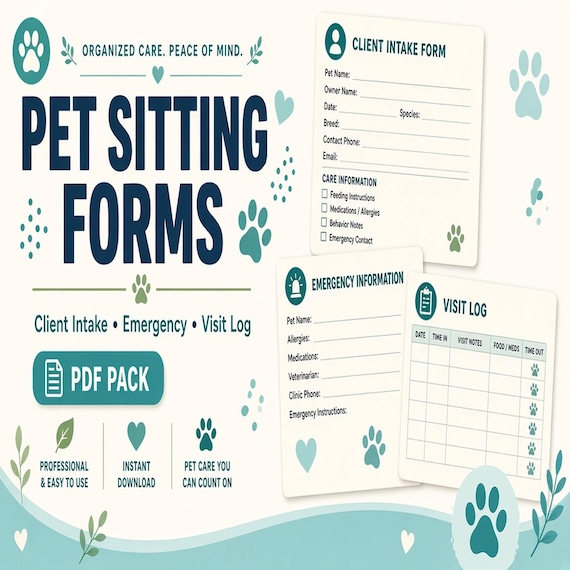
- Choose the Pet Sitting Forms Bundle when pet details, emergency contacts, feeding instructions, medication notes, visit logs, and owner updates are the main handoff across a sitting assignment.
Choose the dog grooming client card for appointment notes and report cards
The Dog Grooming Client Card Template is the most focused choice in this comparison. The current product describes an Excel grooming appointment tracker, printable client cards and report cards in PDF, editable grooming cards in PPTX, a quick-start PDF, and a README or license note. That mix fits a groomer who already knows how appointments are booked but wants a repeatable way to keep preferences, appointment notes, reminders, status, follow-up, and a customer-facing card connected.
This is a strong fit when the report card is part of the service handoff. You can keep a blank card master, customize the editable presentation file for the business, use the workbook for current appointment tracking, and print or export the appropriate card without rebuilding it each time. Check the actual preview to make sure the writing areas, fields, and card style suit the information you record. A polished card is only useful if staff can trace it back to the correct pet and current appointment.
Choose another kit if the main gap is a full mobile route workflow, a meet-and-greet and key handoff, or multi-visit sitting instructions. The dog grooming card product is not described as route software, a booking platform, a veterinary record, or a complete business agreement. Its advantage is focus: grooming notes and customer communication rather than every possible pet-service document.
- Best match: a salon or groomer who needs appointment tracking plus printable or editable client cards.
- Current formats to confirm: XLSX, PDF, PPTX, quick-start PDF, and README files.
- Key fit question: Will the report card be used after most grooming appointments?
- Possible mismatch: you primarily need routes, access records, extended care instructions, or recurring visit logs.
Choose the mobile grooming kit when route planning and service history must connect
Mobile grooming adds an operating layer that a stand-alone report card does not cover. The current Mobile Pet Grooming Client Record Kit is described as a 20-page printable client record kit, an editable Word version, and an Excel workbook for clients, pets, appointments, routes, service history, and supplies. It also includes pre-service condition, grooming preference, follow-up, and incident pages plus a setup guide. That makes it the broader grooming choice when the work moves between locations and the route is part of the appointment day.
A practical setup gives each file one responsibility. Keep current, changing records in the workbook; use the editable document to prepare approved blank forms; and print or annotate the PDF pages when paper fits the appointment. Record only observable conditions and client-provided instructions in the administrative record. If a health concern appears, the template should point staff back to the business's established contact and veterinary referral process rather than invite a diagnosis.
The route tracker is an organizational aid, not live navigation or automatic scheduling. Test whether the fields help you see the next appointment, travel sequence, needed buffer, current service note, and follow-up without duplicating the same status in several places. If you work from one fixed salon and only need grooming cards, the focused dog grooming product may be simpler. If most visits are walks rather than grooming appointments, the dog-walking kit follows that service more closely.
- Best match: mobile groomers who need client, pet, appointment, route, service-history, and supply records together.
- Current formats to confirm: a US Letter PDF, editable Word files, an Excel workbook, and one ZIP package.
- Key fit question: Does the route and mobile appointment sequence create the paperwork problem?
- Possible mismatch: you only need a compact grooming report card or a pet-sitting visit log.
Choose dog-walking forms for recurring visits, access handoffs, and walk reports
The Dog Walking Client and Visit Forms Kit is built around onboarding a client and pet, carrying the right information into recurring walks, and closing the loop after each visit. The current listing describes a 20-page printable forms kit, an editable Word version, and Excel trackers for clients, routes, visits, keys, and payments. It also names meet-and-greet, walk report, incident, and offboarding pages. That sequence is more specific than a generic intake form and more appropriate for walking work than a grooming report card.
The access piece deserves special attention. A key or access-code record should not become a casual note passed through personal messages or left on a public schedule. Before using the template, decide which approved system stores access details, who may see them, how a returned key or changed code is recorded, and when old information is removed. The form can keep a status visible, but it cannot secure a key, encrypt a file, verify a person, or decide a retention rule for the business.
Use the walk report for the factual handoff the client expects after a visit, and keep internal route, payment, incident, and access records separate when they do not belong in that client-facing update. If the service becomes an overnight or multi-day sitting assignment with detailed feeding, medication, and emergency instructions, compare the pet-sitting bundle instead of stretching a short walk form into a broader care plan.
- Best match: independent dog walkers and small teams managing repeated visits and client follow-up.
- Current contents to confirm: PDF, editable Word, Excel trackers, meet-and-greet, walk report, incident, offboarding, and setup pages.
- Key fit question: Do route, visit, key, and walk-report records need to stay connected?
- Possible mismatch: the primary service is grooming or an extended pet-sitting assignment.
Choose pet-sitting forms for instructions that span several visits
Pet sitting usually needs a wider handoff than one scheduled walk. The current Pet Sitting Forms Bundle is described as a printable PDF workbook or forms set, an editable DOCX template, an Excel XLSX tracker, and a README or license note. Its stated uses include collecting pet details, emergency contacts, feeding instructions, medication notes, visit logs, and owner updates. That makes it the clearest fit when the sitter must follow a client-provided routine and record what happened over a series of visits.
The useful distinction is continuity. A pet profile and emergency contact page may remain stable for the assignment, while the visit log and owner update change each time. Keep those roles separate so an old visit note cannot be mistaken for a standing instruction. Date every temporary update, identify which instruction is current, and use the client's approved contact route when something does not match the written plan.
Medication and health notes require restraint. Record only the directions supplied through the owner's and qualified veterinary process; do not use a template to invent, alter, or interpret care. An administrative form is not an emergency protocol or veterinary record. If the main service is a short recurring walk with keys, routes, and payments, the dog-walking kit may be a better fit. If grooming preferences and a send-home report are central, choose one of the grooming products instead.
- Best match: pet sitters and house sitters coordinating instructions, visit logs, emergency contacts, and owner updates.
- Current formats to confirm: printable PDF, editable DOCX, XLSX tracker, and README files.
- Key fit question: Does the assignment require the same instructions to remain clear across several visits?
- Possible mismatch: the work is one grooming appointment or a short walk with a route-and-key workflow.
Choose the client-facing output as carefully as the internal tracker
A form kit can contain both working records and pages meant for the client, but those pages should not be treated as interchangeable. A grooming report card summarizes the grooming handoff. A walk report records a completed visit. A pet-sitting owner update follows an assignment across time. A route, key, payment, supply, or service-history tracker is generally an internal operating record. Decide which output the client receives and which stays inside the business before customizing anything.
Review every client-facing field from the reader's point of view. It should be obvious which pet and service the note describes, when the visit occurred, who completed it, and whether a follow-up is requested. Remove internal shorthand, access details, payment notes, staff-only observations, or unrelated client information. Then check the internal tracker to make sure the client-facing page can be traced to the correct appointment or visit without copying private details onto the public-facing document.
Do not promise a report card or update the business cannot complete consistently. A simpler factual handoff used every time is more useful than a detailed page that staff skip when the schedule is busy. The right download is the one whose output fits the real service routine, not the one with the most attractive cover.
Compare PDF, Word, PowerPoint, and Excel before checkout
File format is one of the clearest differences among these products. The focused dog grooming client-card kit uses Excel for appointment tracking, PDF for printable cards, and PowerPoint for editable card layouts. The mobile grooming and dog-walking kits are described with printable PDF pages, editable Word versions, and Excel workbooks. The pet-sitting bundle also names PDF, DOCX, and XLSX files. None of those labels guarantees that every field appears in every format, so use the current listing previews and file details as the final contents check.
Choose PDF when a stable page is ready to print or annotate. Choose DOCX when the business needs to revise headings, wording, or fields in compatible word-processing software. Choose PPTX when card-style layouts need to be edited in compatible presentation software. Choose XLSX for lists and statuses that change over time. Confirm that the device used after checkout can download a ZIP when one is supplied, extract it, and open the actual formats. A phone-only workflow may be awkward even when the files are technically viewable.
Run one print and one saved export before putting a customized form into service. Check page boundaries, text size, writing space, card alignment, and whether a color design still reads clearly on the printer you will use. Keep an untouched copy of every downloaded master and save customized blanks separately from completed client records.
- PDF: stable printing or annotation.
- DOCX: editable wording and form fields in compatible software.
- PPTX: editable card or layout designs in compatible presentation software.
- XLSX: changing appointment, route, visit, status, or follow-up records.
Check overlap before buying more than one pet-service kit
All four products can touch client details, pet details, notes, and follow-up. That shared foundation does not mean a business needs all four. Compare the pages by the job they add. A mobile groomer may need the mobile record kit and not the separate salon-style card pack. A dog walker who occasionally stays longer may still be well served by the dog-walking kit unless the business has genuinely added multi-visit sitting instructions and owner updates. A pet sitter who does not transport or groom animals may not benefit from route-heavy grooming records.
Make a three-column list before purchase: already handled, missing, and optional. Put the current booking, payment, communication, and record tools in the first column. Put the one repeated failure point in the second: lost preferences, unclear visit notes, disconnected route records, or inconsistent owner updates. Place nice-to-have cards and extra trackers in the third. Choose the product that closes the missing column with the least duplication.
If two services are truly separate, keep separate blank sets and define the point where a client moves from one workflow to the other. Do not merge every field into one oversized form. A walking record, sitting instruction, grooming preference, incident note, and customer report each has a different reader and update rhythm.
Test the full sequence with one fictional pet
Before collecting real client information, run the chosen kit with a fictional pet and fictional owner. Start at the first touchpoint the download covers, complete the relevant profile, schedule a pretend appointment or visit, record a change, create the client-facing handoff, and close the record. Use obviously fictional details so the test can be shared with staff without exposing anyone's contact, access, payment, or animal-care information.
The test should expose practical gaps. Can two pets with the same name be distinguished? Does the appointment or visit date appear everywhere it should? Can a report card or owner update be tied to the correct current record? If a client changes an instruction, is the active version obvious? Can the team tell which blank master is approved and which copy is only a draft? Does the printed page leave enough room for the information the service actually records?
Finish by returning the fictional record to a clean blank state. Keep the successful customized master, archive or delete test exports, and write a short start-here note for the person who will use the kit next. A ten-minute fictional run is much cheaper than discovering after several appointments that two files have become competing sources of truth.
- Use a clearly fictional owner, pet, address, access note, and service date.
- Test one normal visit and one changed instruction or appointment.
- Trace the client-facing update back to the correct internal record.
- Protect the approved blank master before real use begins.
Plan access, privacy, and record retirement before real use
Pet-service records can contain home access details, client contacts, emergency names, payment status, pet routines, and health-related notes. The template gives those details a place to go; it does not decide where they should be stored or who should see them. Choose an approved storage location, limit access to the people who need it for the service, and keep public schedules, customer report cards, and shared route sheets free of unnecessary private information.
Treat keys and access codes as their own controlled handoff. Record the minimum useful status, separate the code itself when the business process requires it, and update returned, replaced, or expired access information promptly. Do not leave a complete key list or home-access page in an unattended vehicle, public binder, open spreadsheet, or client-facing PDF. If a staff member no longer needs access, remove it through the business's established process rather than waiting for an annual cleanup.
Set a review point for stale pet profiles, old instructions, closed assignments, and completed test records. Follow the business's actual agreements, insurer expectations, applicable requirements, and qualified local guidance when deciding retention. The goal is a smaller current record set, not an endless archive of every detail ever collected.
Know what an administrative template cannot decide
These downloads organize paperwork; they do not provide animal-care training, veterinary guidance, diagnosis, emergency direction, insurance, legal advice, or a finished service contract. A field labeled medication, condition, incident, consent, or emergency contact does not make the blank template professionally complete for every business or location. Customize only within the services you actually provide and have agreements or policies reviewed when qualified local guidance is required.
Use client-provided and veterinarian-provided instructions through the business's approved process. Record observations factually without turning them into diagnoses. When a pet's condition, behavior, access situation, or care instruction raises an urgent question, stop the paperwork routine and use the established owner, veterinary, emergency, or supervisory contact path. A completed form should support a responsible decision; it should never be used to avoid one.
Also confirm what is not included before buying. These are digital files, so no printed cards, binders, physical logs, booking service, live route optimization, payment processing, secure client portal, or custom professional review arrives unless the current listing explicitly says otherwise.
Run this final fit check
You should be able to answer each point clearly before choosing a download. If several answers are still uncertain, return to the product previews and compare the actual pages instead of guessing from the title.
- My primary service is grooming, mobile grooming, walking, or sitting.
- I know which record changes after every appointment or visit.
- I know whether the main output is a report card, walk report, owner update, route record, or visit log.
- The current file formats work with my device, software, printer, and storage process.
- The kit adds a missing job instead of repeating forms I already use.
- I have a secure plan for contacts, access details, pet information, and completed records.
- I can test the blank set with fictional information before collecting real client data.
- I understand which professional, veterinary, legal, insurance, and emergency decisions remain outside the template.
Choose the current download that matches the job
Choose the featured Dog Grooming Client Card Template when appointment tracking, grooming notes, reminders, and a printable or editable report card are the clearest needs. Its current product page describes XLSX, PDF, PPTX, quick-start, and README files. Choose the Mobile Pet Grooming Client Record Kit when client and pet profiles, appointments, routes, service history, supplies, follow-up, and incident pages need to work together in a broader mobile workflow.
Choose the Dog Walking Client and Visit Forms Kit when meet-and-greet, route, visit, key, payment, walk-report, incident, and offboarding records define the service. Choose the Pet Sitting Forms Bundle when emergency contacts, feeding instructions, medication notes, visit logs, and owner updates need continuity across a sitting assignment. Open each SteadyStackStudio product page, inspect the current previews and formats, then use Etsy only when the contents match the service you actually run.
Skip the purchase if you need a custom contract, veterinary record, secure client portal, live scheduling or route software, payment processing, physical stationery, or professional review included. The best pet-service template is not the broadest one. It is the one that makes the next real handoff easier without creating a second system you will not maintain.
Printables used in this guide
Instant downloads from the SteadyStackStudio Etsy shop.
Dog Grooming Forms
A calm, practical download for mobile pet groomers and small grooming teams that need consistent appointment, pet-profile…
Pet Sitting Forms Bundle
A polished template kit for pet sitters, dog walkers, house sitters, pet care businesses, and solo service providers.

Cleaning Business Forms Bundle
Cleaning business forms bundle for residential cleaners and small cleaning companies: 26-page fillable PDF with client intake…
Dog Boarding Forms
Dog Boarding Intake Forms: 21-page fillable intake/contract/vet-release/behavior pack + Word + Excel stay tracker with real SUM…