Service Business Forms · Aug 28, 2026 · 16 min read
Wash-and-Fold Order Workflow: Intake, Bag Tags, Status Tracking, and Pickup
A practical guide to setting up wash-and-fold order slips, bag tags, customer instructions, status tracking, and a clear pickup handoff.
Confirm what the current laundry download is built to do
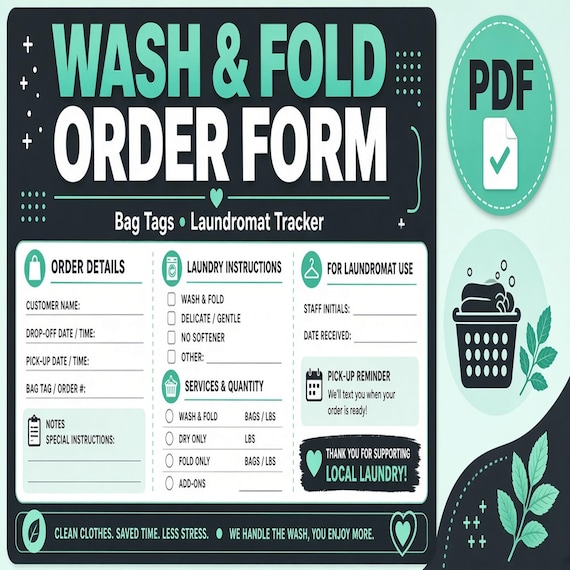
The current SteadyStackStudio wash-and-fold package is a digital template kit for laundromats, wash-and-fold services, laundry pickup businesses, and small cleaners. The listed files are an Excel laundry order tracker, printable order slips and bag tags in PDF, editable shop cards in PowerPoint PPTX, a quick-start PDF, and a README or license note. Its description centers on customer bags, order notes, pickup windows, status, and issue follow-up. No printed materials are shipped.
That file list makes the kit a practical starting point for a small manual or spreadsheet-led system. It does not claim to be a point-of-sale platform, barcode system, payment processor, route planner, automated messaging service, garment-care authority, customer agreement, or staff training program. Check the current product previews and file details before choosing it, especially if you need live scanning, multiple locations, automatic texts, online booking, or a direct connection to scales and payments.
The useful question is not whether a template has many pages. It is whether one order can move from the counter to the correct shelf and back to the correct customer without relying on memory. Set up the files around that path first. Add more fields only when they prevent a real mistake or make a handoff clearer.
- Use the PDF pages for repeatable printed slips and physical bag identification.
- Use the Excel file as the shared order list and status view.
- Use the editable shop cards only for information customers or staff need to see repeatedly.
- Choose separate software when your volume or required features exceed a printable-and-spreadsheet system.
Give every order one identifier from drop-off to pickup
A wash-and-fold system becomes fragile when the counter slip, bag tag, spreadsheet row, shelf label, and payment note use different ways to identify the same order. Choose one order identifier and put it everywhere the order appears. It can be a simple daily sequence, a date plus sequence, or another format that works with the system you already use. Keep it short enough to write and read accurately, but distinct enough that yesterday's order cannot be confused with today's.
The order identifier should lead; a customer name or phone number should not have to carry the whole system. Names repeat, handwriting varies, phone numbers change, and a household may place more than one order. A visible order number lets staff match the paper, bags, spreadsheet, hanging pieces, shelf location, and pickup record without exposing more personal information than necessary on every tag.
Decide how corrections work before the first real order. If an identifier is written incorrectly, do not quietly invent a second number on one bag. Mark the correction consistently on every connected item and record who made it. If an order is canceled or recreated, keep its history clear rather than reusing the old number for another customer.
- Place the same identifier on the intake slip, every bag tag, the tracker row, and the final handoff record.
- Use a separate bag count such as 1 of 3, 2 of 3, and 3 of 3 when one order has several bags.
- Reserve one clear format so staff do not alternate between initials, dates, phone numbers, and informal nicknames.
- Never reuse an identifier while the earlier order could still appear in records, storage, or follow-up.
Build intake around the decisions the team must make next
An intake slip should collect enough information to process and return the order, not every fact that might be interesting someday. Start with the next decisions: who owns the order, what service was requested, how many bags or separate pieces were received, when the order is expected, how the customer should be contacted, what payment state applies, and which customer instructions require attention. Add the shop's actual service choices and remove options the shop does not offer.
Keep observations and customer requests separate. For example, a customer may request fragrance-free detergent, cold water, separate processing, hanging for certain items, or a particular pickup window. Record the request as a request. Then follow the shop's approved policy and the garment information that applies. A customer preference does not automatically prove that one method is suitable for every item in the bag.
Use plain labels that can be understood during a busy handoff. Avoid unexplained abbreviations unless every person using the system has the same reference. If a field is regularly left blank because staff do not know what it means, rename it, make its trigger more specific, or remove it. If a missing field can stop processing, make the incomplete status visible instead of allowing the order to drift into the work queue.
- Confirm the customer's preferred contact route and the order's promised or estimated pickup window.
- Count bags and separately handled pieces before the customer leaves.
- Record the requested service and any selected options using the shop's current service names.
- Mark unresolved questions clearly and route them to the person responsible for the decision.
- Give the customer a receipt or reference that matches the identifier retained by the shop.
Tag every bag before it leaves the intake point
The bag tag is the physical link between an order and its record. Attach or place it according to the shop's method while the order is still in front of the person completing intake. Waiting until several untagged bags are behind the counter turns a simple identification task into a memory test. If one order arrives in multiple bags, label all of them before another customer's order is accepted.
A practical tag needs only the information required to keep the bag connected: the order identifier, bag sequence and total, and any short handling cue the shop has approved. If a name is used, keep privacy and visibility in mind. Full contact details, detailed notes, or sensitive information usually do not need to travel on the outside of a bag when the identifier can point to the controlled order record.
Plan for the tag to remain readable through the full path. Test the paper, attachment method, handwriting or printer output, and where the tag sits during sorting, washing, folding, storage, and pickup. A beautiful tag that tears, smears, detaches, or is hidden under a knot is not doing its job. Keep spare blank tags at the intake point, but do not pre-number loose tags in a way that invites accidental reuse.
- Tag first, then move the bag into the accepted-order area.
- Show both the order number and the bag sequence for multi-bag orders.
- Use the shortest approved handling cue; keep full notes in the order record.
- Test tag readability and attachment with the bags and storage method the shop actually uses.
- Create a documented replacement process for a damaged or missing tag.
Keep customer preferences separate from garment care information
Laundry orders can contain mixed fabrics, trims, dyes, finishes, and care labels. A spreadsheet can preserve a customer's instructions, but it cannot determine whether those instructions are appropriate for every garment. Build a stop-and-check path for items whose care information conflicts with the requested service, cannot be read, appears incomplete, or calls for a service the shop does not provide.
Use the care label and the shop's approved procedures as source information rather than guessing from appearance. Garment instructions may address washing method, water temperature, bleaching, drying, ironing, and warnings. A request such as high heat, bleach, or wash everything together should not quietly override a warning or the shop's acceptance policy. Record what was noticed, what question was raised, who was contacted, and the resulting decision under the shop's current terms.
Make the boundary clear before acceptance. The order form can document customer instructions and an agreed next step, but it should not promise that every item is washable, stain-free, shrink-proof, colorfast, or suitable for the same process. If the shop does not inspect individual pieces at the counter, say what the actual intake process is and how later questions are handled. Clear expectations are more useful than a broad guarantee the workflow cannot support.
- Record preferences exactly enough that another staff member can follow the request.
- Use a visible hold status when care information or handling instructions need review.
- Do not convert a customer request into a garment-care conclusion.
- Follow the shop's reviewed policy for unsupported services, unclear labels, special pieces, and conflicting instructions.
- Document customer contact and the final agreed handling choice when a question arises.
Use a short status path that answers one question: what happens next?
A useful tracker should show the next action without requiring someone to read every note. Choose a small set of statuses that match the real work. A basic path might include accepted, waiting for clarification, ready to process, in process, quality check, ready for pickup, completed, and issue follow-up. Your shop may need fewer. The important part is that each status has a shared meaning and an owner.
Define the entry and exit rule for each status. For example, ready for pickup should mean the order has been matched to its bag count, any hanging or separate pieces are accounted for, the final amount or payment state is clear, and the order is in the recorded storage location. It should not simply mean that folding has finished. Completed should mean the handoff was verified and recorded, not merely that someone expects the customer already came.
Avoid statuses that describe a mood instead of an action, such as almost done, urgent, or problem. If urgency matters, keep a due time or priority field beside a precise status. If there is a problem, identify the type, owner, next contact time, and current hold. A single red cell with no explanation may attract attention, but it does not tell the next person what to do.
- Keep status choices short, visible, and mutually understandable.
- Pair each hold or exception with an owner and next action.
- Record the storage location when an order becomes ready.
- Use timestamps or initials only where they help reconstruct a handoff or prevent duplicate work.
- Close the order only after the customer or approved recipient receives every connected piece.
Create one exception lane instead of scattering problem notes
Every service encounters questions: an unmarked loose item, a bag count that no longer matches, a care instruction that needs review, a requested add-on, a missed pickup window, a payment question, or a customer concern after handoff. These cases should not disappear into free-text notes that are invisible from the main order list. Give exceptions a consistent status, owner, next action, and follow-up time.
Keep the description factual. Record what was received or observed, what the customer reported, what staff did, and what remains unresolved. Avoid assigning blame or promising a result before the facts and current policy have been reviewed. If an image or supporting document is needed, use the shop's approved storage and privacy method rather than attaching it casually to a personal message thread.
Separate an active exception from the final outcome. The tracker can show when a question opened, when contact was attempted, when a response arrived, and when the case closed. This prevents an old warning from following an order forever and makes unfinished follow-up visible during a shift change. For disputes, safety concerns, legal questions, or insurance matters, use the qualified guidance and formal process that apply to the business rather than relying on a template entry alone.
- Use one exception status that is easy to filter from the main order list.
- Name the next action, responsible person, and follow-up time.
- Keep factual notes separate from the shop's final decision or resolution.
- Close the exception only when the promised follow-up is complete and documented.
- Move issues beyond the template when they require professional, insurer, legal, or safety review.
Make the pickup handoff a verification step, not a search
Pickup should begin with the same identifier created at intake. Find the tracker row, confirm the customer's name or other approved verification, check the recorded storage location, and retrieve every bag and separately handled piece tied to the order. For a multi-bag order, count the physical pieces against the tag sequence before anything leaves the counter.
Review the payment state and any approved customer-facing note before handoff. If the order has an unresolved hold, missing piece, or open follow-up, the status should prevent an accidental completed handoff. When someone other than the original customer may collect an order, follow the shop's verification and permission policy rather than improvising from a text message at the counter.
Record completion at the time it occurs. A simple date, time, and staff identifier may be enough for a small shop, depending on its established policy. If pickup or delivery includes reusable bags, hanging items, route stops, or return containers, add only the handoff checks the business actually needs. The goal is a reliable chain from accepted to returned, not paperwork for its own sake.
- Locate the order from its identifier and recorded storage position.
- Count all bags, hanging pieces, and separately stored items before handoff.
- Confirm the approved recipient and payment state under the shop's current policy.
- Do not mark completed while an order-level hold or missing piece remains open.
- Record the handoff immediately so another shift does not search for an order that already left.
Assign the PDF, spreadsheet, and editable cards different jobs
The file formats in the current package are most useful when each has one clear role. Keep the original downloaded ZIP and README unchanged in a source folder. Make working copies before editing. Use the printable PDF slips and bag tags where paper must travel with an order. Use the Excel tracker as the central list for status, pickup timing, and follow-up. Use the editable PowerPoint shop cards for stable counter or staff information, not as a second order database.
Avoid copying the same changing fact into too many places. The bag tag can point to the order number; the tracker can hold the full status and notes. The customer receipt can show the reference and pickup information. When a pickup window changes, update the central record and the customer communication rather than hoping every old printed copy will be corrected by hand.
Protect the blank masters. Save an approved working version with a date or version number, remove outdated copies from the counter and shared folders, and keep completed order records away from reusable templates. If several computers edit the tracker, decide which copy is authoritative and how simultaneous changes are prevented. A spreadsheet duplicated into several downloads folders quickly becomes several conflicting order lists.
- Keep one untouched source package and one controlled set of working masters.
- Use the order number to connect files instead of repeating every detail everywhere.
- Store the central tracker where approved staff can reach the same current copy.
- Retire outdated blank forms and shop cards when wording, services, or policies change.
- Keep customer records separate from the reusable files purchased from the shop.
Protect customer details without making the counter slower
A laundry order can include names, phone numbers, addresses, access notes, payment state, service preferences, and issue history. Collect only what the business needs for the stated service and current policy. Keep detailed contact information in the controlled record rather than printing it across every external bag tag or shelf marker.
Decide who can open or edit the spreadsheet, where paper slips wait during processing, how completed orders are archived, and when records are removed under the requirements that apply to the business. Account for copies in email, downloads folders, shared drives, printed stacks, photos, and personal devices. A password on one laptop does not protect a photographed slip or an exported workbook sent elsewhere.
Use fictional information for setup and training. Do not test the template with a real customer's name, address, phone number, or garment issue. If the shop moves to a point-of-sale or customer messaging system later, confirm how old spreadsheet and paper records will be closed, retained, or transferred so two active sources do not disagree.
- Keep public-facing tags minimal and put detailed notes in the controlled order record.
- Limit editing access and decide which copy of the tracker is authoritative.
- Include paper, exports, backups, messages, and photos in the privacy plan.
- Train with unmistakably fictional orders and remove them before launch.
- Follow the business's applicable retention, disposal, and customer-information requirements.
Test three fictional orders before using the system at the counter
Run the complete workflow with fictional data on the actual computer, printer, bags, counter, storage shelves, and handoff area. The first test should be a simple one-bag order with no special instructions. The second should use several bags plus one separately handled piece. The third should include an unclear instruction or care question that places the order on hold. These three paths reveal more than proofreading the forms on a screen.
Have another staff member continue each order without verbal coaching. They should be able to match every bag to the correct record, see what happens next, locate the order after it is marked ready, identify an unresolved hold, and complete pickup without asking where the real information lives. If they must rely on the person who designed the system, simplify the labels and handoffs.
Print at normal size and inspect margins, writing space, text contrast, tag readability, and attachment. Sort the fictional orders onto the real shelves, then retrieve them in a different sequence. Correct confusing fields, duplicate entries, vague statuses, and missing stop points. Delete the fictional records after the approved blank set and staff instructions are updated.
- Test a normal one-bag order, a multi-bag order, and an order placed on hold.
- Use the real workspace and supplies rather than reviewing only on a screen.
- Ask someone who did not build the forms to finish the handoffs independently.
- Check that every physical item and digital record can be matched at each stage.
- Fix the workflow before entering customer information or printing a large batch of forms.
Use a brief opening, shift-change, and closing review
A tracker stays useful only when its status reflects the floor. At opening, review orders due that day, active holds, scheduled pickups or deliveries, and unresolved customer contacts. At a shift change, hand off exceptions, priority times, and orders whose physical location changed. At closing, compare accepted orders with their current physical stage and confirm that ready orders are in the recorded location.
Once a week, look for repeated friction rather than simply counting orders. Are bag counts often corrected? Do staff use several spellings for the same service? Are pickup windows being recorded in notes instead of the due field? Are completed orders left open? Does one exception type recur because the intake question is unclear? Adjust one field, label, or staff instruction at a time, then test it.
Archive or filter completed work according to the business's record policy so the active view remains readable. Do not delete unresolved follow-up merely to make the list look clean. A small accurate tracker is more useful than a large sheet full of stale rows, duplicate tests, and statuses nobody trusts.
- Opening: due orders, holds, customer contacts, and scheduled handoffs.
- Shift change: exceptions, changed locations, priorities, and next actions.
- Closing: physical stage compared with tracker status and shelf location.
- Weekly: repeated corrections, unclear fields, overdue follow-up, and unused statuses.
- Archive only under the business's current record and retention process.
Know when a printable tracker is no longer the right fit
The featured kit fits best when a small laundry service wants editable and printable order tools plus a central spreadsheet, and when staff can keep one shared record current. It may be enough for a new or lower-volume service that needs consistent intake, bag identification, status visibility, pickup timing, and follow-up without purchasing a larger software platform immediately.
It is probably not the right fit when the business requires barcode scanning, scale integration, automatic price calculation, card processing, recurring customer profiles, online ordering, route optimization, driver tracking, automatic pickup messages, inventory across several locations, simultaneous editing controls, or formal audit logs. A printable form does not gain those features because a spreadsheet sits beside it. Compare dedicated laundry or point-of-sale systems when manual handoffs become the bottleneck.
Before choosing the download, confirm the current previews, file formats, software compatibility, printing method, bag-tag attachment, shared-file plan, service menu, care-label process, customer communication, privacy handling, and staff responsibilities. Skip it if the shop already has a reliable system, if the files would duplicate a point-of-sale record, or if no one will own the daily updates. Choose it only when every file has a clear place in the order's real path from intake to verified return.
- Good fit: a small team, one controlled order list, printable counter tools, and a defined handoff path.
- Check first: current contents, previews, Excel and PowerPoint access, printer output, and shared-file rules.
- Use dedicated software when scanning, automation, integrations, routing, or multi-location controls are required.
- Do not buy a second tracking system unless it will replace a known gap rather than duplicate an existing record.
Printables used in this guide
Instant downloads from the SteadyStackStudio Etsy shop.
Laundry Business Forms
Keep customer bags, order notes, pickup windows, and issue follow-ups easier to track. This is a premium digital template kit for…

Cleaning Business Forms Bundle
Cleaning business forms bundle for residential cleaners and small cleaning companies: 26-page fillable PDF with client intake…
Product Pricing Calculator Spreadsheet
Product Pricing Calculator Spreadsheet with Small Business Profit Margin, Cost of Goods, Wholesale and Retail Price Excel PDF…

Side Hustle Income and Expense Tracker
Track a side hustle like a small business with an income and expense tracker, profit spreadsheet, mileage log and tax set-aside…