Service Business Forms · Jul 5, 2026 · 6 min read
Construction Estimate Calculator Spreadsheet: Bid Template Checklist
A practical checklist for comparing construction estimate calculators and contractor bid templates before choosing an Excel or Google Sheets download.
Start with the job type and scope
A construction estimate calculator should match the kind of work being priced. A small repair, room remodel, trade-specific job, subcontractor bid, and full project proposal all need different levels of detail. If the download only looks like a generic invoice, it may not give enough space for materials, labor, phases, allowances, and notes.
Before choosing a spreadsheet or form pack, write down the job type, who will receive the estimate, whether it is a rough planning number or a formal proposal, and which costs must be explained line by line. The best file is the one that helps a client understand the scope without making you rebuild the same math for every job.
- Small repairs need clear task descriptions, labor time, materials, and a simple total.
- Remodeling jobs need room or phase sections so scope does not blur together.
- Subcontractor bids need project details, trade-specific scope, exclusions, and acceptance notes.
- Larger projects may need materials, labor, permits, contingency, taxes, payment schedule, and change-order notes.
Look for line-item math instead of one lump sum
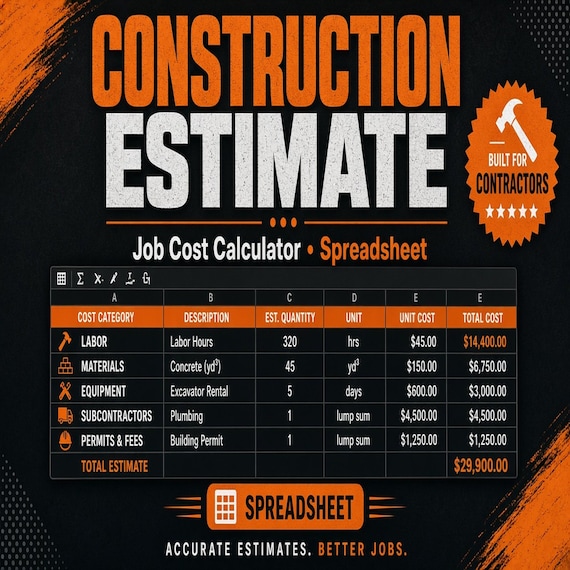
A useful estimate spreadsheet should make the price build visible. Clients may not need every internal detail, but you need enough structure to check whether the total came from real quantities, hours, rates, and cost categories instead of a single guessed number.
- Materials: item name, quantity, unit cost, markup or margin if used, and total.
- Labor: task, estimated hours, hourly rate or crew rate, and subtotal.
- Other costs: permits, disposal, delivery, rental equipment, travel, or subcontractor charges.
- Adjustments: tax, contingency, discount, deposit, and final estimated amount.
- Summary: a clean total that matches the line items and can be reviewed before sending.
Separate estimate, bid, proposal, and invoice jobs
These words often get used together, but they do not do the same job. An estimate helps a client understand likely cost. A bid or proposal usually carries a clearer scope and acceptance path. An invoice is sent after work is completed or billed in stages. A single download can include more than one page type, but the previews should make that clear.
If you need a contractor bid template, look for a proposal-style layout with project details, owner or client information, scope of work, exclusions, totals, and signature or approval lines. If you only need internal pricing, a calculator workbook may matter more than a polished client-facing page.
- Use an estimate page when the client needs a clear early price range or itemized quote.
- Use a proposal or bid page when scope, terms, and acceptance need to be shown together.
- Use an invoice page when payment is being requested for completed or staged work.
- Use the spreadsheet calculator behind the scenes when you need to test costs before sending anything.
Check the editable inputs before trusting the total
A spreadsheet preview should show where you type the job details. The best calculators make editable inputs obvious and keep formula cells protected or clearly labeled. If every preview image only shows a finished cover, it is harder to know whether the workbook will fit the way you price jobs.
- Project fields: client name, job address, estimate number, date, expiration date, and contact details.
- Scope fields: task descriptions, room or phase labels, notes, exclusions, and allowance lines.
- Cost fields: quantity, hours, rates, unit costs, tax, contingency, and payment terms.
- Output fields: subtotal, tax, deposit, balance due, final estimate, and printable client view.
- Instructions: a quick-start note showing which cells to edit and which cells calculate automatically.
Protect the scope with notes, exclusions, and change details
The lowest number on a page can become a problem if the scope is vague. A practical construction estimate template should leave room to say what is included, what is excluded, what assumptions were used, and what happens if the client adds work later.
This is especially important for remodels, specialty trades, and jobs where material prices, site conditions, or client choices can change. The template does not replace professional review, but it can help keep the conversation clearer before work begins.
- Scope included: exactly which rooms, tasks, materials, or services are covered.
- Scope excluded: demolition, hauling, permits, fixtures, repairs, or upgrades not included in the price when relevant.
- Allowances: budget placeholders for finishes, materials, or client-selected items that may change.
- Change notes: a simple reminder that added work or changed selections may require a revised estimate.
- Expiration: a date or note that helps avoid relying on old material prices or outdated availability.
Choose Excel, Google Sheets, PDF, or Word on purpose
Excel and Google Sheets are strongest when formulas, repeat jobs, and cost changes matter. PDF and Word pages are useful for client-facing forms, printable proposals, and simple records. Many contractors benefit from a pack that includes both: a calculator for the math and a clean estimate or proposal page for the client.
Before checkout, confirm exactly which formats are included. If you plan to edit the file on a jobsite laptop, Excel may be easiest. If you want browser access or shared review, Google Sheets may fit better. If you mainly need a printable client page, a PDF or Word template can be enough.
- Choose Excel when you want an offline workbook with formulas and reusable job tabs.
- Choose Google Sheets when you want browser access and easy copying.
- Choose PDF when you need a clean printable page and do not need live formulas.
- Choose Word or DOCX when the wording, scope notes, or client-facing layout need heavier editing.
- Choose a bundle when the calculator and client proposal page need to work together.
What to compare in product previews before Etsy checkout
Use the product page as a fit check before you leave for checkout. A good construction estimate download should show enough of the inside pages to understand the workflow, not just a cover image. Compare the preview images, file list, editable areas, instructions, and whether the example looks like the kind of job you actually price.
- Preview images should show calculator inputs, line-item sections, summary totals, and client-facing pages.
- The description should say whether the download is for contractors, subcontractors, remodelers, or general service pricing.
- The included files should be clear: Excel, Google Sheets, PDF, Word, or ZIP download.
- The form should include enough room for scope notes, exclusions, payment terms, and signature or approval details if needed.
- The spreadsheet should be simple enough to reuse without hiring someone to customize it first.
How it fits with other business downloads
A construction estimate calculator handles the job quote, but it may not cover the rest of the business workflow. After a quote is accepted, many small service businesses still need income tracking, profit review, client forms, project checklists, or a cleaner way to organize repeat paperwork.
That is why it helps to compare adjacent downloads in the same visit. A contractor may start with the estimate calculator, then use a profit-and-loss tracker for monthly review. A cleaning business or photo booth business may need a more complete form bundle instead of a construction-specific bid sheet.
- Use the construction estimate calculator for bids, estimates, line items, and proposal math.
- Use a profit-and-loss spreadsheet when the question is monthly income, expenses, and taxes.
- Use a service form bundle when contracts, checklists, intake questions, and client replies matter more than construction line items.
- Use a pricing calculator when the main job is product or service margin, not a project proposal.
Quick fit guide before you open Etsy
The SteadyStack construction estimate calculator is a good fit when you want a reusable spreadsheet and contractor bid template for job details, materials, labor, taxes, totals, and client-facing estimate notes. It may be more than you need if you only want a blank printable receipt, a full project-management app, or custom legal wording written for your exact location.
- Best fit: contractors, subcontractors, remodelers, handymen, and small service businesses that need repeat estimate math.
- Good adjacent fit: owners who also need profit tracking, cleaning forms, photo booth forms, or general small-business pricing sheets.
- Skip it: buyers who need physical printed forms shipped, custom professional review, or a fully managed estimating system.
- Next step: open the matching product page, confirm the previews and file formats, then use Etsy only when the template fits the job you are pricing.
Printables used in this guide
Instant downloads from the SteadyStackStudio Etsy shop.
Construction Estimate Template Spreadsheet
A practical bid calculator for contractors, remodelers, and handyman jobs. This is an instant digital download built for a solo…
Cleaning Business Forms Bundle
Cleaning business forms bundle for residential cleaners and small cleaning companies: 26-page fillable PDF with client intake…
360 Photo Booth Business Kit
Launch or clean up a 360 photo booth rental business with a practical digital kit: contract-style paperwork, pricing calculator…

Photo Booth Business Kit
A premium photo booth business kit for organizing your offer, pricing, client documents and event-ready visual templates without…