Therapy Worksheets · Aug 18, 2026 · 14 min read
Trauma Worksheet Setup: Map the Window of Tolerance, Build a Grounding Menu, and Keep a Safety Plan Close
A practical setup guide for turning a trauma-stabilization PDF into one small map–ground–plan loop: a window-of-tolerance map, one grounding menu, and a nearby support or safety reminder without printing the full workbook at once.
Start with one map–ground–plan loop
A trauma-stabilization workbook is easier to use when its pages form one small loop: notice the current state, choose one grounding or support option, and keep a nearby reminder of contacts or boundaries. That is a different job from completing every worksheet in order. A 31-page file can be a page library rather than a 31-step assignment.
Begin by naming the practical question the first pages should answer. Do you need a clearer picture of what “inside the window,” “too activated,” and “shut down” look like for this person? A short menu of grounding options that can be found without searching a binder? A place to record already-known support contacts? Select the page whose fields match that question. If two pages ask for nearly the same information, start with one and leave the other in the blank master file.
These printables can organize education, self-reflection, and appropriately guided professional work. They do not diagnose trauma, decide what a body sensation means, create an individualized treatment plan, or provide crisis care. Personal users should keep the task low-pressure and within the product’s stated educational scope. Professionals should use the pages only within their training, policies, consent process, privacy requirements, and the needs of the person they support.
- Map: choose one page that describes the current window or signal pattern without trying to explain everything.
- Ground: choose one menu, five-senses plan, or before-and-after check that can be used in a real moment.
- Plan: keep one support, boundary, or reminder page close enough to find later.
- Keep unused pages in the original file until a clear need appears.
Confirm the file package before planning your setup
The featured SteadyStackStudio Trauma Therapy Worksheets Bundle is currently described as a 31-page printable PDF workbook and form kit with 28 unique worksheet or form pages. The package also lists a PDF quick-start guide and a README and license note. It is an instant digital download, not a physical workbook, and the stated use is to print selected pages or annotate them in a PDF app.
The listed sample pages include a Window of Tolerance Map, Hyperarousal Signal List, Hypoarousal Signal List, Green-Yellow-Red Check-In, Grounding Menu Builder, Five-Senses Grounding Plan, Safe Place Visualization Notes, Container Exercise Notes, Resource List Page, Body Cue Tracker, Trigger Map Without Details, Before/After Grounding Check, Choice + Control Page, Boundary and Safety Script, Support Contact Card, and Crisis / Emergency Reminder Page. Those names show several page roles, so the right setup depends on the job rather than the total page count.
Before checkout, compare the current description with the direct page previews. Check text size, writing room, page orientation, and whether a printable PDF or PDF-annotation workflow fits the device and routine you will actually use. The listing does not state that an editable Word file or spreadsheet is included, so do not assume those formats are part of this package.
- Included format shown: printable PDF pages plus PDF support files and a license note.
- Delivery shown: digital download only; no printed workbook is shipped.
- Use shown: print selected pages or work from a copy in a compatible PDF app.
- Do not assume: editable Word pages, spreadsheet trackers, custom guidance, or a mailed binder.
Map the current window without turning the page into a conclusion
The Window of Tolerance Map can support a first mapping step when the task is to place “inside the window,” “too activated,” and “too shut down” in one view. Use it as a working sketch of what the person already notices, not as proof of a diagnosis or a complete history. A short, accurate map is more useful than a full page of guesses.
Use plain, descriptive wording. Record what was noticed, when it occurred, and what happened next without treating one entry as an explanation of cause. If a field does not apply, leave it blank rather than forcing the experience into the page’s structure. The map should stay revisable. A later entry can correct, narrow, or replace an earlier note when more is known.
Set a review point before collecting more entries. If the page is for personal reflection, that may mean checking whether the map made the next grounding or support decision clearer. If it is used in a professional setting, the practitioner should decide how the page is introduced, discussed, stored, and documented. The blank template itself does not make those decisions and is not a clinical record system.
- Choose the window map when the current-state picture is the main question.
- Describe observations and sequence; do not turn a worksheet entry into a diagnosis.
- Leave unused fields blank instead of filling them to look complete.
- Stop collecting entries when the page is not changing the next useful conversation.
Keep hyperarousal and hypoarousal lists as two different jobs
The Hyperarousal Signal List and Hypoarousal Signal List should not automatically be treated as one combined inventory. A hyperarousal list may fit when the current question is what too-activated looks like in the body, attention, or behavior. A hypoarousal list may fit when the narrower question is what shutdown, numbness, or collapse looks like for this person. Mixing both onto one informal scrap of paper can hide which pattern is actually present.
Write only signals the person already recognizes or is willing to notice. Do not add dramatic language to make the list look more serious. A useful entry is specific enough to be recognized later: a change in breathing, muscle tension, temperature, attention, speech, movement, or the urge to leave, freeze, or go blank. Avoid graphic trauma details. The purpose of these lists is recognition, not retelling.
Review the lists after a few ordinary days, not only after a difficult one. If a listed signal never appears or is too vague to use, revise or retire it. Professionals should decide whether these pages belong in an approved record and how they will be protected. Personal users should keep the lists in a private place and share them only with people they have already chosen to involve.
- Use the hyperarousal list for too-activated signals the person already recognizes.
- Use the hypoarousal list for shutdown or collapse signals, not as a second copy of the first list.
- Keep wording specific, ordinary, and free of graphic detail.
- Revise or retire a signal that is too vague to notice in real time.
Use the green-yellow-red check-in as a snapshot, not a score
The Green-Yellow-Red Check-In can hold a current-state snapshot when a simple color label is easier to complete than a long narrative. Green can mean “inside a workable window,” yellow can mean “nearing the edge,” and red can mean “already outside a workable range.” Those labels are only useful when they are defined in advance and used the same way each time.
Do not treat the colors as a grade. A red or yellow mark is information for choosing the next small support step, not a failure. A green mark does not prove that nothing is wrong or that support is unnecessary. If the person cannot choose a color, leave the page unfinished rather than guessing. A forced color can create a false sense of precision.
Pair the check-in with one next action already written on another page, such as a grounding option or a support contact. The check-in itself does not tell anyone what to do. After a few uses, ask whether the color language made the next step easier to choose. If it only creates extra recording, retire the page and keep the blank master.
- Define the three colors before the first real use and keep those meanings stable.
- Treat the mark as a snapshot, not a pass-or-fail score.
- Leave the page blank when a color cannot be chosen honestly.
- Connect the snapshot to one already-chosen grounding or support option.
Build one grounding menu and one five-senses plan
The Grounding Menu Builder and Five-Senses Grounding Plan both support a grounding step, but they are not interchangeable. A menu can hold several already-acceptable options so the person does not have to invent an idea in the moment. A five-senses plan can organize one short sequence that uses sight, sound, touch, smell, or taste in a way the person has already agreed is suitable. Choose the page that matches the current decision.
Keep the first version short. Three to five options on a menu are usually easier to use than a long list that no one can scan quickly. Each option should be available in the actual setting: at home, in a session room, at work, or in another agreed place. Do not include options that require equipment the person does not have, a private space that may not exist, or a sensation the person has already said is unhelpful.
Use one primary grounding page for the first setup. Running a menu, a five-senses plan, a safe-place page, and a before-and-after check at the same time creates duplicate decisions. Add the Before/After Grounding Check only when there is a reason to record what was noticed before and after the same chosen option. The printable does not determine which grounding method is safe or clinically indicated.
- Menu: organize a short set of already-acceptable grounding options.
- Five-senses plan: write one short sequence the person can actually complete.
- Keep options available in the real setting, not only in an ideal setting.
- Add a before-and-after check only when that extra record will be reviewed.
Treat visualization and container notes as optional, low-pressure pages
The Safe Place Visualization Notes and Container Exercise Notes can support a later step when the person already uses, or is being guided through, those kinds of exercises. They are not required for a first setup. Some people find a visualized place or a “set-aside” image helpful. Others find imagery confusing, activating, or simply unused. Do not add these pages because they sound more complete.
If you do use one of them, keep the notes brief and under the person’s control. A useful page records what image, phrase, or stopping rule the person chose, not a long invented scene. Leave room to stop the exercise. If imagery is not a good fit, return to a concrete grounding menu or a five-senses plan instead of pushing the visualization page.
Professionals should introduce these pages only when they fit the current work, the person’s consent, and the setting. Personal users should skip them when the exercise is unfamiliar or uncomfortable. The product is a page library. Unused pages can stay in the master file without making the download less useful.
- Skip visualization or container pages when a concrete grounding option is enough.
- If used, record the person’s chosen image, phrase, and stopping rule only.
- Stop the page when imagery is confusing, unused, or not appropriate.
- Do not treat unused optional pages as unfinished homework.
Use a trigger map without details, then stop
The Trigger Map Without Details is named to keep the page from becoming a trauma narrative. Use it only when a broad map of cues, settings, or times of day would help someone notice a pattern and choose a support step. Write the smallest label that still makes the cue recognizable later. Do not add story, images, or graphic content to fill empty lines.
A useful map can name a category such as a time of day, a kind of conversation, a crowded place, a body cue, or another already-known context. It should not become a list of events. If writing even a short label is too activating, stop and return to a grounding or support page. The worksheet is optional. It is not a requirement for using the rest of the packet.
Review the map after a few entries. If it only restates what everyone already knows, or if completing it leaves the person more unsettled than before, retire it. Professionals should decide whether this page is appropriate at all and how any completed copy will be stored. Personal users should keep it private and should not send a completed map through an unsecured channel.
- Write the smallest recognizable label, not a story.
- Stop immediately if completing the page is too activating.
- Use the map only when it changes a later grounding or support choice.
- Store or discard completed copies according to privacy needs, not convenience.
Keep support contacts and crisis reminders as location cards, not treatment
The Support Contact Card, Resource List Page, Boundary and Safety Script, Choice + Control Page, and Crisis / Emergency Reminder Page can hold information the person or professional has already identified. They do not create a safety plan by themselves, and they do not replace local emergency services, a qualified clinician, or an existing crisis procedure. Fill only contacts, scripts, and reminders that are already known and appropriate.
A support card is easiest to use when it names who can be contacted, how, and for what kind of help. A resource list can hold already-chosen local or professional resources. A boundary or choice page can hold wording the person has already practiced. A crisis reminder page can hold the person’s already-known local emergency number and any other contacts they or a professional have already selected. Do not copy generic hotlines from memory if you are not sure they apply to the person’s location.
Keep these pages easy to find and separate from longer reflection worksheets. A card that lives under a stack of unused printouts will not be used. If someone is in immediate danger, contact local emergency services. A downloaded PDF is educational and organizational only. It is not crisis support, medical advice, diagnosis, treatment, legal advice, or documentation-compliance guidance.
- Record already-known contacts and procedures; do not invent a crisis plan on the page.
- Name who, how, and for what kind of help on the support card.
- Keep reminder pages easy to find and separate from longer worksheets.
- Use local emergency services for immediate danger; the printable is not a response system.
Test a small page set, then print or annotate with privacy in mind
A practical starter set can contain one mapping page, one grounding page, and one support or reminder page. For example, someone might choose the Window of Tolerance Map, Grounding Menu Builder, and Support Contact Card when those layouts match the intended educational or professionally guided task. Another setup might use the Green-Yellow-Red Check-In, Five-Senses Grounding Plan, and Crisis / Emergency Reminder Page. These are examples of page roles, not universal treatment sequences.
The listing supports printing selected pages or annotating the PDF in a compatible app. For paper use, print one blank test page and check margins, contrast, text size, and writing room before producing a larger set. Keep the untouched download separate from completed pages. Do not leave sensitive pages in an open printer tray or shared workspace. For digital use, make a working copy instead of writing over the original, and confirm that the chosen app can save annotations and reopen them correctly.
Use a plain version or date label that does not expose private details in the file name. Store completed copies only in a location appropriate for the information, with access limited to the people who need it. Professionals should follow their approved privacy, documentation, retention, and disposal practices rather than treating a downloaded worksheet folder as a record system. Personal users should also consider who can access a shared device, cloud folder, email account, or home filing area.
- Starter role 1: one map or check-in for the current window or color snapshot.
- Starter role 2: one grounding menu or five-senses plan.
- Starter role 3: one support, boundary, or reminder card that can be found quickly.
- Paper and digital checks: margins, saved annotations, access, backup, and secure disposal.
Compare neighboring worksheet packs by the job of the page
Choose the featured trauma worksheet bundle when the current previews and page list fit mapping a window of tolerance, listing activation or shutdown signals, building a grounding menu, keeping a trigger map without details, or holding support and reminder cards. Choose the Anxiety Coping Skills Workbook when the primary job is anxiety-pattern tracking, worry and control sorting, a 5-4-3-2-1 card, breathing logs, or exposure-planning pages rather than a stabilization map.
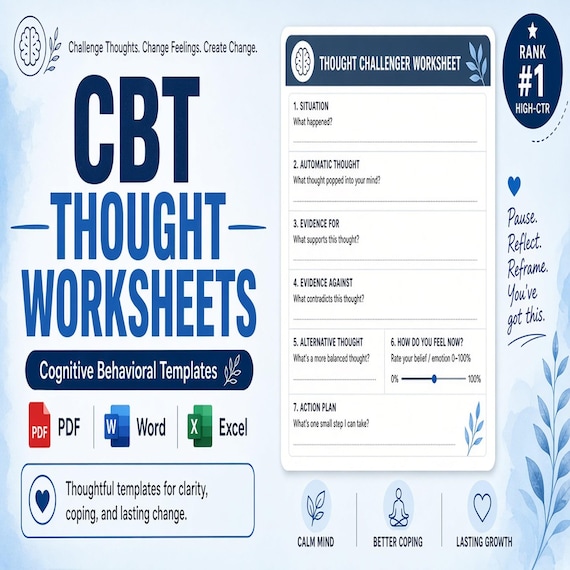
The DBT Skills Workbook centers named mindfulness, distress-tolerance, emotion-regulation, and decision-practice pages such as STOP, TIPP, paced breathing, and Check the Facts. The depression-cycle workbook is organized around a cycle map, tiny-task planning, activity menus, and before-and-after or pleasure-and-mastery review. The CBT thought-challenging workbook focuses on thought records, evidence review, balanced-thought work, and distortion sorting. The grief workbook focuses on check-ins, memory and loss reflection, hard-day and anniversary planning, and related bereavement pages.
Open the current product previews rather than choosing by a shared word such as grounding, safety, tracker, coping, or workbook. Similar labels do not make the page flows interchangeable. The better fit is the smallest complete pack whose main page role, format, support level, and stated license match the way it will actually be used.
- Window mapping, signal lists, and stabilization reminders: compare the trauma worksheet bundle.
- Anxiety cards, worry sorting, and practice logs: compare the anxiety workbook.
- Named DBT skills practice: compare the DBT workbook.
- Activity mapping and tiny-task review: compare the depression-cycle workbook.
- Thought records and evidence review: compare the CBT thought-challenging workbook.
- Bereavement reflection and hard-day planning: compare the grief workbook.
Complete this fit check before you open Etsy
A good fit should be specific enough to name the first small page set you would use. Confirm the current 31-page printable PDF package, 28 unique worksheet or form pages, PDF quick-start guide, README and license note, digital delivery, and direct page previews. Make sure a PDF-only workflow works for the intended printer, device, writing style, storage plan, and level of support.
Check the scope as carefully as the page names. The product is described for educational, organizational, and self-reflection use by trauma-informed therapists, counselors, coaches, groups, and self-help buyers seeking printable stabilization tools. It is not medical advice, diagnosis, mental health treatment, documentation-compliance guidance, legal advice, or crisis support. A professional should already have the training, assessment, consent, privacy, documentation, and follow-up process required for the setting. A personal-use customer should know when a printable is not enough and seek appropriate qualified or emergency help when needed.
Skip this download if you need a physical workbook, editable Word pages, spreadsheet trackers, individualized guidance, a secure record platform, or urgent support. If the featured pages are close but not exact, compare the neighboring therapy worksheet products and the anxiety page-selection guide before checkout. Open Etsy only after the file format, first page set, license, storage plan, and practical use are clear.
- I can name the mapping, grounding, and support pages I would try first.
- I checked the current inside-page previews, PDF format, and digital-delivery details.
- I know how blank masters and completed pages will be stored and protected.
- I understand the educational scope, stated license, and limits of the download.
- I will choose another resource or appropriate support if this file does not fit the task.
Printables used in this guide
Instant downloads from the SteadyStackStudio Etsy shop.
Trauma Therapy Worksheets Bundle
Trauma Therapy Worksheets Bundle with Grounding Techniques, Safety Plan, Window of Tolerance, PTSD Coping Skills Printable PDF.
Anxiety Workbook
Anxiety Workbook with Anxiety Coping Skills Worksheets, Grounding Cards, CBT Anxiety Worksheets Therapy, Anxiety Thermometer…
DBT Worksheets Bundle
DBT Worksheets Bundle with DBT Skills Emotion Regulation, Distress Tolerance, Wise Mind, Mindfulness Coping Skills Therapy…
Depression Workbook
Depression Workbook with CBT Behavioral Activation Worksheets, Depression Cycle, Mood Tracker, Activity Schedule Printable PDF.