Caregiver & Just in Case · Jul 30, 2026 · 13 min read
Important Documents Organizer: Map Household Records, Storage Locations, and Review Dates
A practical, privacy-conscious way to create one household records map, label secure locations, track missing documents, and keep review dates current.
Confirm what the current organizer is designed to hold
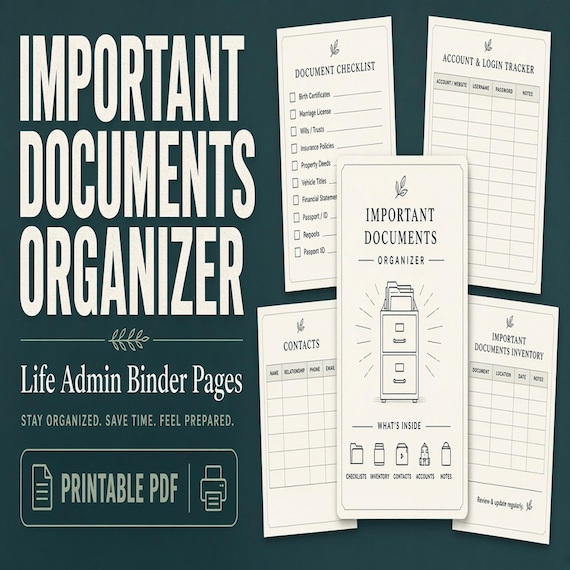
An important-documents organizer is most useful when the problem is not creating new policies, certificates, or legal papers, but knowing what already exists, who it belongs to, and where the current record can be found. The featured SteadyStackStudio organizer is currently described as a digital download with printable PDF organizer pages, an editable Microsoft Word file, a Quick Start PDF, and a README/license note. No physical binder or printed pages are shipped. Review the current previews, included formats, software fit, and license before checkout so the working method matches the devices and printer the household will actually use.
The current listing names sections for ID documents, family certificates, insurance, property and housing, vehicles, tax and financial records, medical and school records, safe or lockbox contents, digital backups, document requests, and updates. That makes it a focused records map rather than a general emergency plan, password manager, medical log, or final-wishes planner. Use it to point to verified records and unfinished requests. It cannot issue a replacement document, confirm that a policy is active, grant access to an account, or replace advice from the organization or qualified professional responsible for a record.
- Expect a digital PDF and editable Word workflow, not a shipped binder.
- Use the organizer to map existing records and document locations.
- Check the current product previews and file details against your software and printing plan.
- Keep legal, medical, tax, financial, insurance, and access decisions with the appropriate source or professional.
Treat the organizer as a map, not the place every original must live
Before filling a page, decide what the organizer should reveal about each document. A useful entry can identify the record, the person or property it belongs to, the organization that issued or maintains it, the secure place where the current version is stored, and the date that location was checked. That is often enough to stop a stressful search. It does not require placing every original, full account number, identification copy, password, or access code in an ordinary household binder.
Separate three ideas: the index entry, a working copy, and the official record. The index tells an authorized reader where to look. A working copy may be convenient for a specific appointment or task. The official original or certified copy may need different storage and handling. Those three items do not have to sit together. Decide case by case whether a copy belongs in the binder at all, follow instructions from the issuing organization, and use physical or digital storage suited to the information's sensitivity.
- Record enough detail to find the current document without copying every sensitive field.
- Distinguish an index entry from a convenience copy and an official original.
- Do not assume a printable page grants authority or proves a record is current.
- Choose storage and access controls separately from the page layout.
Choose the household boundary and one owner for the current index
Define whose records belong in this organizer before gathering paper. A single-adult household, couple, family with children, multigenerational home, or shared property may need different boundaries. List the people, homes, vehicles, and other record groups the file is meant to cover. Keep unrelated relatives, former addresses, closed accounts, or business records outside the active household index unless there is a clear reason and permission to include them. A deliberate boundary keeps the organizer usable and reduces unnecessary exposure.
Then name one person responsible for maintaining the current index, even if several people supply information. This role is administrative: collect verified updates, mark unresolved items, replace stale pages, and record review dates. It does not make that person the legal owner of every record or give them access they do not otherwise have. For records shared between adults, agree on the label, location, and update process. For another person's private records, include only what the household is authorized and genuinely needs to organize.
- Write down the people, properties, vehicles, and record groups included in this file.
- Keep personal, household, and business systems separate when their access needs differ.
- Assign one maintainer for the current index and update log.
- Treat record ownership, permission, and legal authority as separate from binder maintenance.
Create storage-location labels that remain clear over time
A note such as “in the drawer” works only for the person who wrote it. Give each approved storage place a stable, private label that another authorized household member can understand, such as the name of a secure home file, a lockbox section, a provider portal, an attorney's office, or a protected digital folder. Use the same wording throughout the organizer. If a location changes, update the location once in the index and check every record that points to it instead of leaving two labels for the same place.
Keep the label useful without advertising more than the intended reader needs to know. A shared quick-reference copy might say that an original is in secure household storage and identify the person to contact, while a more restricted master index carries the precise approved location. Avoid putting combinations, alarm codes, complete keys, passwords, or recovery secrets into the location name. Test each label by asking whether an authorized person could distinguish it from every other file, folder, box, or portal without verbal translation.
- Use one consistent name for each physical or digital storage place.
- Replace vague directions such as “upstairs” or “online” with a distinguishable approved label.
- Keep access secrets outside location labels and ordinary index pages.
- Update every affected entry when a storage place is renamed or moved.
Index identity documents and family certificates from records in front of you
Work from the actual records rather than memory. For each identification document or family certificate, use the name shown on the record, identify the document type, note who it belongs to, record the issuing or maintaining organization when helpful, and point to the current approved location. If the organizer does not need a full document number or a copy to do its job, leave that sensitive detail out. Add a last-checked date so a later reader can tell whether the location was recently confirmed.
Move carefully from one household member to the next so names, certificates, and locations do not cross between people. If a record is missing, expired, damaged, or being replaced, do not mark it complete merely because an older copy exists. Put the task in the document-request tracker and keep the index status factual: located, needs verification, request in progress, or received, for example. Use the language and process of the issuing organization rather than guessing whether a copy is official, certified, acceptable, or still valid.
- Copy names and document types from the record itself.
- Attach every entry to the correct person and approved storage location.
- Use a last-checked date instead of assuming an old location is still correct.
- Track missing or replacement records openly rather than filling gaps from memory.
Connect insurance, property, and vehicle records to their current sources
Insurance, housing, property, and vehicle paperwork often exists in several forms: an original, a current statement or card, an online account, an email, and an older file. Choose which source the household treats as current for each record type. The index can identify the policy or record category, the covered person, property, or vehicle, the responsible organization, a verified contact route, the approved storage location, and the date the source was checked. Keep superseded copies clearly separated from the current record.
Do not use the organizer itself as proof of ownership, coverage, registration, title status, or a deadline. Confirm those details with the current document and the responsible organization. If a renewal, move, sale, purchase, or provider change affects several sections, make one short task list and update each linked entry after the official records change. Avoid copying complete policy, title, loan, or account details into a broadly accessible page when a partial reference and secure location are enough to find the real document.
- Identify the current source for each insurance, property, housing, and vehicle record.
- Keep older versions out of the active section or label them clearly as superseded.
- Verify status and dates with the actual record or responsible organization.
- Update linked entries after a move, purchase, sale, renewal, or provider change.
Map tax and financial records without building a casual account directory
The tax and financial section can help the household locate records by year, institution, advisor, or document type without reproducing a complete financial profile. Decide which categories belong in the map, such as filed returns, supporting tax documents, property-related statements, or records maintained by a qualified professional. Point to the approved physical or digital location and record who maintains the file. Keep passwords, security answers, payment credentials, and other access secrets out of an ordinary records index.
Retention, access, and disclosure needs vary by record and situation, so the template should not set a universal keep-or-destroy schedule. Follow the responsible institution's instructions and obtain qualified tax, financial, or legal guidance when needed. When a year or task is closed, mark the index entry as reviewed and move working papers out of the active area according to the household's approved method. The goal is a reliable path to the source, not a thick binder full of copied statements that nobody has checked.
- Organize financial and tax entries by a consistent year, source, or document-type pattern.
- Point to the maintained record instead of copying unnecessary account details.
- Keep credentials and security answers outside the household document map.
- Use the appropriate institution or professional for retention and access decisions.
Separate medical and school record locations from changing working logs
A document map can identify where current insurance records, provider contacts, school records, enrollment documents, immunization records, accommodation paperwork, or other verified files are maintained when they apply to the household. Keep each entry attached to the correct person and source. Record the location and last review date, then direct authorized readers to the official portal, office, secure file, or dedicated organizer that holds the fuller record.
Frequently changing medication lists, appointment notes, daily care observations, assignments, and school communications are different jobs. If the household needs to maintain them actively, use the medical information binder, caregiver system, school portal, or other approved working tool rather than crowding the important-documents index with changing details. A location page cannot diagnose, direct care, authorize release, establish school rights, or replace current instructions. Its job is to reduce searching and make the correct source easier to identify.
- Label medical and school records by the correct person and maintaining source.
- Record where the current document can be found and when that location was checked.
- Keep changing care, appointment, or school activity logs in the system meant for them.
- Do not treat the index as medical direction, consent, authorization, or an official school record.
Use the safe and lockbox inventory without exposing access secrets
The current organizer includes a safe or lockbox inventory section. Use it to describe what categories of household records are stored there, who is responsible for them, and which approved person can answer access questions. A contents map can prevent duplicate searches and show that an original exists without putting the original in a less secure binder. Keep the description specific enough to distinguish items but no broader than the authorized reader needs.
Do not write a combination, key hiding place, alarm code, password, recovery phrase, or other access secret on a page that may circulate. A note that something is in a safe does not grant permission or authority to open it, and possession of the organizer does not change the requirements attached to a document. Decide separately how an authorized person will obtain access when appropriate, confirm that arrangement with the relevant people or professionals, and review the contents map whenever an item is added, removed, or relocated.
- Inventory record categories and responsible contacts rather than every exposed detail.
- Keep combinations, key locations, credentials, and recovery secrets out of circulating pages.
- Handle access permission and authority outside the printable index.
- Update the contents map after any approved addition, removal, or move.
Build the digital-backup map around folders, owners, and recovery routes
The listed Digital Backup Map can connect paper records to approved digital copies without becoming a password sheet. For each backup group, identify the document category, the person responsible for maintaining it, the protected service or device where it is stored, the folder or file label an authorized user should look for, and the date the backup location was tested. Use filenames that distinguish the subject and document date without exposing unnecessary private information in a shared folder view.
A backup is useful only if the household can tell which version is current and the intended person can reach it through an approved process. Review access controls, recovery methods, and backup practices according to the service, device, and household needs. Do not place passwords, one-time codes, security answers, or recovery keys in the document map. If online-account continuity is the main problem, use a dedicated digital-life organizer and a suitable credential-management method rather than stretching the important-documents page into a second, less controlled account list.
- Map the protected service or device, folder label, responsible person, and test date.
- Use clear file naming so the current copy can be distinguished from an older scan.
- Keep passwords and recovery secrets outside the document-location map.
- Use a dedicated digital-life system when online accounts and credentials are the primary job.
Turn missing paperwork into a controlled document-request queue
A missing record should become a visible task, not a blank field that everyone assumes someone else will solve. Use the listed Document Request Tracker to name the needed record, the person or property it belongs to, the issuing organization, the date the request began, the current status, and the next follow-up. Record any reference supplied by the organization only when it is appropriate to keep in the working file. Save confirmations and received documents in their approved locations rather than scattering them across email, downloads, and paper piles.
When a document arrives, verify what was actually received before marking the request complete. A photocopy, informational record, certified copy, replacement card, and newly issued original may serve different purposes; use the issuing organization's description instead of inventing a label. Add the confirmed location to the main index, record the update, and close the request with the received date. If the request stalls, keep the status honest and identify the next contact step rather than entering a guessed document date or number.
- Give every missing record an owner, source, start date, status, and next action.
- Keep request confirmations attached to the task until the record is received and filed.
- Describe the received item using the issuing organization's language.
- Update the main index and close the request only after the new location is confirmed.
Maintain one current index and use the update log to retire stale copies
Archive the original download unchanged, then create a clearly dated working copy. Decide whether the editable Word file, the printed PDF pages, or a deliberate combination will be the household's current index. If both paper and digital versions exist, name one as the master and explain how the other is replaced. Avoid several complete copies that quietly drift apart. Mark the front page with a review date and use the listed Update Log to record which section changed, why it changed, and who confirmed the new source or location.
Review affected entries after a move, household change, new or replaced identification, insurance change, property or vehicle transaction, provider change, new storage arrangement, or completed document request. Also choose a regular review point for records that do not trigger an obvious event. Remove or securely dispose of superseded working pages according to their sensitivity, and keep historical records only when the household has a clear reason and approved method. An incomplete current index is safer to trust than a polished file mixing current and obsolete locations.
- Keep the purchased originals unchanged and maintain a separate dated working copy.
- Declare one paper or digital index as the current master.
- Log the section, reason, source, date, and maintainer for each change.
- Replace stale copies so an authorized reader does not have to choose between versions.
Run a five-item find test, then choose the smallest organizer that fits
Test the finished map with an authorized household member or use nonsensitive sample entries when the reviewer should not see the real records. Ask the person to locate five different sources, such as one family certificate, one current insurance record, one property or vehicle document, one tax-year folder, and one medical or school record location. Watch for vague labels, duplicate versions, crossed names, missing review dates, and paths that depend on information only the maintainer knows. Correct the map before adding more records.
Choose the featured Important Documents Organizer when the main gap is a focused PDF and Word map for IDs, certificates, policies, household records, safe or lockbox contents, digital backups, missing requests, and updates. Choose the Family Emergency Binder when contacts, home plans, sitter notes, and caregiver handoffs lead the job; the Medical Information Binder for active medication and appointment organization; the Home Maintenance Binder for repairs and warranties; or the Moving Planner for address changes and move tasks. Choose the Death Binder or Complete Life Admin Binder only when the household genuinely needs broader just-in-case coverage. Compare current previews and select the smallest complete system that will remain current.
- Test five different record paths without coaching the reader through the labels.
- Fix unclear locations, duplicate masters, crossed owners, and missing review dates.
- Use a focused organizer when document location and currency are the real problems.
- Choose a broader or role-specific binder only when its additional working sections are genuinely needed.
Printables used in this guide
Instant downloads from the SteadyStackStudio Etsy shop.
Important Documents Organizer
A practical important documents organizer for busy households that need one map for IDs, certificates, policies, records, and…
Family Emergency Binder Printable
Family emergency binder for households: 28-page fillable PDF with household profile, emergency contacts, medical info pages…
Just in Case Binder Printable
Give your family a calm, practical Just-in-Case binder — 48 printable pages + editable Word — so key contacts, document…
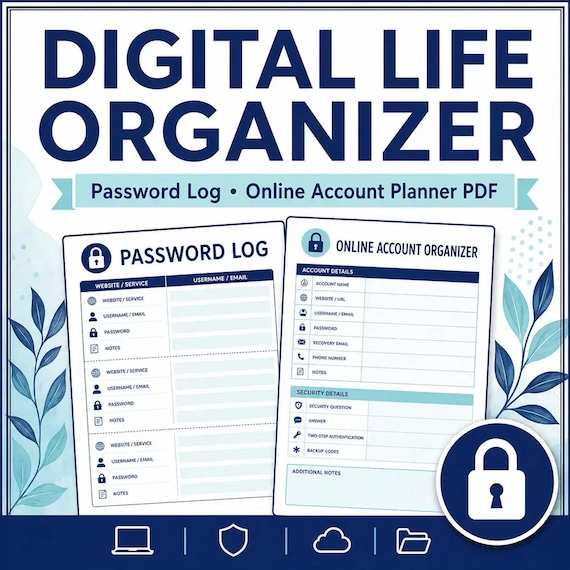
Digital Life Organizer
A practical digital life organizer for families who need a safe overview of online accounts, devices, subscriptions, and digital…