Caregiver & Just in Case · Sep 24, 2026 · 16 min read
Vacation Rental Host Welcome Book Setup: Guest Pages, House Rules, and a Cleaner Turnover Packet
A practical setup for hosts who need one guest book and one cleaner packet before the next stay. Confirm the PDF, Excel workbook, and quick-start guide, then fill the welcome page, Wi-Fi and house rules, checkout notes, local picks, cleaning checklist, inventory, maintenance log, and restock tracker.
Start with the next turnover, not a cover design
A welcome book is finished when a guest can find the Wi-Fi password and a cleaner can reset the unit without calling you. A styled cover does not answer either of those questions. Start with the next checkout you actually have, including the property name guests will see, the checkout time, and the person who will clean.
This download is a house manual and a turnover packet. The listing includes a printable PDF workbook, an Excel workbook that is Google Sheets import-friendly, a quick-start guide, and a README or license note. The named pages are a welcome page, Wi-Fi and house rules, checkout instructions, local recommendations, a cleaning checklist, an inventory list, a maintenance log, and a restock tracker.
It is an organizer for one property's guest notes and turnover notes. It is not a rental agreement, a local-law summary, a pricing tool, or a live link to your booking calendar. If a sentence would change what a guest already accepted on the listing, fix the listing first. Then print the reminder.
- Name the property, the next checkout, and who cleans before you edit.
- Keep the guest booklet and the cleaner packet as two printed sets.
- Use the file to organize notes you already know are true. It does not create house rules, permits, or insurance.
Confirm the files before you customize a working copy
Open the ZIP before you rewrite anything. Confirm the printable PDF workbook, the Excel workbook, the quick-start guide, and the license note are all there. Open the PDF and check that you can find the eight named pages. If a page you expected is missing, re-download the file. Do not rebuild a missing page from memory and then wonder which version is current.
Make two folders. The blank master stays untouched. The working folder is the property you are setting up today. If you host more than one place, each place gets its own working copy. Trash day, parking, and towel counts are not interchangeable, and a cleaner should not have to guess which page belongs to which address.
If you want the counts in Google Sheets, follow the quick-start import note on a copy of the Excel file. Do not type over the only workbook in the ZIP, and do not assume a shared sheet exists until you have created one from that file. Keep a backup before you change any formula. Type in the input cells. Leave calculated cells alone unless you know why you are editing them.
Print one test page, such as the welcome page, on the paper you will leave in the unit. Read it at arm's length in the light of the room, not on the laptop. Check that a password or phone number is not clipped by the margin. A page that looks fine on screen can lose the one line a guest needed.
- Confirm the PDF, Excel file, quick-start guide, and license note.
- Match the eight named pages before you add your own wording.
- Save a blank master and edit only a working copy.
- Print one test page and check that passwords and phone numbers are fully visible.
Split the guest book from the cleaner packet
Guests and cleaners are doing different jobs, so they should not share one stapled stack on the coffee table. The guest book is what a person can read after they put a bag down: welcome, Wi-Fi, house rules, checkout, and local recommendations. The cleaner packet is what you hand to the person turning the unit: cleaning checklist, inventory list, restock tracker, and the maintenance notes that apply to this stay.
A guest does not need your par level for trash bags. A cleaner should not have to hunt through restaurant notes to find the linen count. Print the guest pages as one short booklet and leave that booklet in a spot you name on the welcome page. Print the staff pages as a clipboard packet, or keep the changing counts in the workbook and print a fresh page when the numbers change.
If a co-host answers messages and a cleaner handles the unit, give each person only the pages they use. Put the same host phone number on both packets so a stuck lock, a missing remote, or a late checkout has one place to go. Do not leave a standing master door code in the guest booklet that stays in the unit between stays. Access codes often change by booking. Say where the current access note lives, usually the booking message, and what to do if entry fails.
- Guest book: welcome, Wi-Fi, rules, checkout, and local notes.
- Cleaner packet: checklist, inventory, restock, and stay maintenance.
- Keep rotating door codes out of the booklet that stays behind.
- Put one host phone number on both packets.
Write the welcome page a guest can use in the first minute
The welcome page is the page people actually read. Keep the greeting to a few lines. Then put the facts they need before they unpack: the property name as it appears in the booking, the address they should give a driver, check-in and check-out times, your preferred way to reach you, and who to call if they cannot get in.
Write the address the way a driver should use it, including a unit number, a gate name, or a parking instruction if those details are easy to miss. If parking is one assigned spot, say which spot and what to do if it is taken. If street parking has a limit you have already published, repeat that limit. Do not add a new parking rule on the printed page that was not in the listing.
Add one emergency contact path that is correct for this property. Include your number, plus the local emergency number for the country where the unit sits. If you name a clinic or hospital, use one you have confirmed is still the nearest practical option. An old copied address is worse than a blank line. International guests may not know the local emergency number, so print the local one rather than assuming they will look it up after something goes wrong.
Read the finished welcome page out loud once. If you cannot find the address, the times, and a phone number in under a minute, cut sentences until you can. A long story about the neighborhood belongs later, if it belongs anywhere.
- Lead with the address, the times, and how to reach you.
- Repeat parking only if it already matches the listing.
- Print the local emergency number, and confirm any clinic name before you include it.
- Cut the welcome page until those facts are easy to find.
Put Wi-Fi and house rules on one scannable page
The Wi-Fi and house rules page should answer two questions without a story: what is the network, and what did the guest already agree to? Write the network name and password exactly as they appear on the router, including capital letters, numbers, and spaces. Then join that network from your own phone while you stand in the unit. A password that works in the office and fails in the bedroom is not ready to print.
Note where the router sits, and write only the restart step you want a guest to try. If you have a second network, name it. If you do not, do not invent one. If the password changes, replace the printed page the same day. A screenshot in a text thread is not a substitute for the page on the table, because the next guest may never see that thread.
House rules on this page should match the listing, not a stricter set you thought of after the booking. Repeat quiet hours, smoking, pets, parties, parking, and the maximum guest count only when those are the rules the guest already accepted. If a rule is not on the listing, do not introduce it at the door through a booklet. This page is a reminder. It is not a rental contract and it does not replace the house-rules field on the platform where you take bookings.
Trash day, the door that must stay locked, and the grill that must stay cold are worth one line each if they prevent a real problem. Skip rules you will not enforce. A page full of unused rules trains guests to ignore the line that mattered.
- Copy the Wi-Fi name and password exactly, then test them on a phone in the unit.
- Replace the printed page the day the password changes.
- Match house rules to the listing the guest already accepted.
- Leave out rules you do not enforce and networks you do not have.
Make checkout instructions match the job you actually want done
Checkout instructions fail in two ways. They ask for a hotel-style reset the guest was never told about, or they skip the one task that blocks the cleaner. Write the real ask: what time to be out, where to leave keys, whether to start the dishwasher, where trash goes, and whether beds should be stripped.
If you do not want guests to strip beds, say that in a plain sentence. If you do want dishes started, say that too. A vague request to tidy the unit produces a half-done kitchen and a message late at night. List the few tasks that change the turnover, and stop. Guests should not be asked to run the cleaner's full checklist.
Put the same checkout time on the welcome page, the checkout page, and the listing. If those three disagree, fix them before you print. A late checkout belongs on the cleaner packet the same day, because it shortens the clean. Write the new time in words the cleaner can see. Do not leave it only in a guest-facing sentence or in a message the cleaner never received.
Say where keys, fobs, and parking passes go at checkout. If a lockbox is used, say whether the guest should return the key to it or leave it on the counter. One missing key is an inventory problem and a lock problem. The checkout page is the right place to prevent it.
- State the checkout time, key return, trash, dishes, and whether to strip beds.
- Ask only for tasks you will actually check.
- Copy a late checkout onto the cleaner packet the same day.
- Name where keys and passes go before the guest leaves.
Keep local recommendations current and specific
Local recommendations help when they are short and true. Name the place, say what it is for, and add a walking time or neighborhood only if you have checked it. Coffee, a grocery stop, and a pharmacy or other practical shop belong ahead of attractions. Guests ask for those first, often after they have already arrived.
Add hours only when you have confirmed them recently. A closed restaurant printed as open late creates a worse message than a blank line. Skip claims you cannot stand behind. A note such as tacos, two blocks toward the river, cash and card is useful. A claim that a place is the best in the city is not something this page should make.
If a recommendation is seasonal, date the note in your working file so you can drop it when the stand closes. Do not paste a list from another host's book, and do not add a place you have not visited or would not send your own guests to. A short list that is current is easier to trust than a long list that includes last year's hours.
Keep this page out of the cleaner packet. The cleaner needs the linen closet, not the bakery. If a guest asks for a recommendation that is not printed, answer in the booking thread and add it to the working file only after you would print it for the next guest too.
- Lead with grocery, a pharmacy or practical shop, and one reliable food stop.
- Write distance or hours only when you have checked them.
- Date seasonal notes and remove places you have not confirmed.
- Keep restaurant notes out of the cleaner packet.
Build the cleaning checklist around the real turnover
The cleaning checklist is for the person resetting the unit, not for the guest. Walk the property once and write tasks in the order the cleaner moves: entry, kitchen, baths, beds, trash, and the final lock-up. A checklist copied from a hotel will miss the grill, the pack-and-play, the stairs, or the outdoor shower your unit actually has. A checklist that lists rooms you do not have wastes time and makes the real gaps harder to see.
For each area, write what done means in plain language. Kitchen done is not a check. Dishes washed or loaded, counters clear, coffee maker emptied, and trash taken to the bin is a check. Note where supplies live: linens, vacuum, spare bags, and cleaning liquids. If a supply is not in the unit, do not write a step that depends on it.
If you hire a cleaning business that uses its own inquiry, walkthrough, estimate, and invoice, that paperwork is a different download. This checklist is the property reset you hand to the person doing this unit. It does not replace their contract, their insurance, or your agreement with them. Do not ask this page to do both jobs.
Add a photo request only for a specific spot you actually need to see, such as a stained cushion or a made bed when you are not on site. Do not ask for a photo of every drawer. After the clean, mark what was finished and what was short, then update the workbook. A marked paper packet that never returns to the file will be wrong on the next stay.
- Walk the unit and list the rooms and outdoor areas you really have.
- Define done for kitchen, baths, beds, trash, and lock-up.
- Note where linens and supplies are stored.
- Keep a cleaning company's sales paperwork in its own forms bundle.
Count inventory and set restock levels before the first stay
The inventory list and the restock tracker are different counts. Inventory is what should still be in the unit after checkout. Restock is what gets used up. A remote control is inventory. Coffee pods, soap, and trash bags are restock. Mixing them makes a missing remote look like a shopping item and an empty soap dispenser look like a lost object.
Walk with the inventory page and write the item, the room, and the count you expect after a clean turnover. Include keys, remotes, pillow sets, towel sets, and any small appliance a guest is likely to ask about. If something is decorative and not for guest use, say so, so a cleaner does not replace it from a lost-and-found box or pack it away as clutter.
On the restock tracker, set a number you can actually keep. Plenty is not a par level. Write who buys the item and where the extras are stored. After the first stay, correct the number if the cleaner ran out or threw away an unopened pack. A par that was guessed in the kitchen will be wrong until someone checks the closet.
Use the Excel workbook for counts that change every turnover. Use the PDF for the list you print and clip to the clipboard. Follow the quick-start before you overwrite sample rows. If you import the workbook into Google Sheets, import a copy, then share that copy only with the co-host or cleaner who needs the counts. The license note covers how the blank files may be used. Do not send the blank master to every cleaner as a file they can pass on.
- Inventory: items that should still be there after checkout.
- Restock: consumables with a numeric par and a storage spot.
- Update counts in the workbook, then print a fresh clipboard page when a par changes.
- Share a working copy, not the blank master file.
Use the maintenance log for stay issues, not the whole house history
The maintenance log is for problems that show up around a stay. A dripping faucet reported on Saturday, a remote missing at checkout, or a lock that stuck on arrival belongs here. Write the date, the item, who reported it, what you did, and whether the unit is ready for the next guest.
Close each line. An open faucet note with no status will be copied into the next stay by accident. If the unit should not be rebooked until a repair is done, write that in words the co-host can see, and update your booking calendar yourself. The spreadsheet does not change availability on any platform.
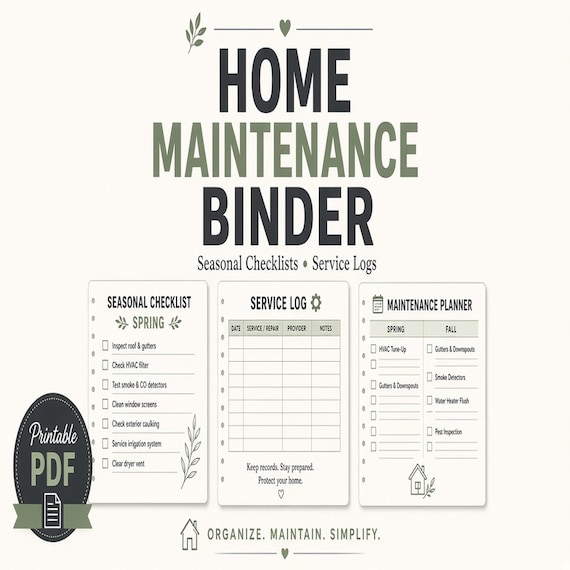
Do not turn this page into a lifetime repair archive. Warranties, contractor invoices, filter schedules, and paint colors belong in a home maintenance binder. If a guest issue becomes a pro repair, note the handoff here and keep the pro paperwork in that other binder. One line in the stay log should point to the other record. It should not duplicate the invoice.
A guest-facing welcome book should not list open repairs in a way that hides a safety problem, and it also should not publish your pro's private number for every future guest to call. Tell the current guest what they need to know for this stay. Keep the pro history in the maintenance log and the home binder.
- Log the date, the item, who reported it, the action, and whether the unit is ready.
- Close the line before the next check-in.
- Send warranty and contractor history to the home maintenance binder.
- Update the booking calendar yourself. The workbook will not do it.
Choose a different download when the job is not a guest stay
This packet fits a short-term rental welcome book and turnover. It is the wrong file for several nearby jobs, even when those jobs also involve a house, a checklist, or a cleaner.
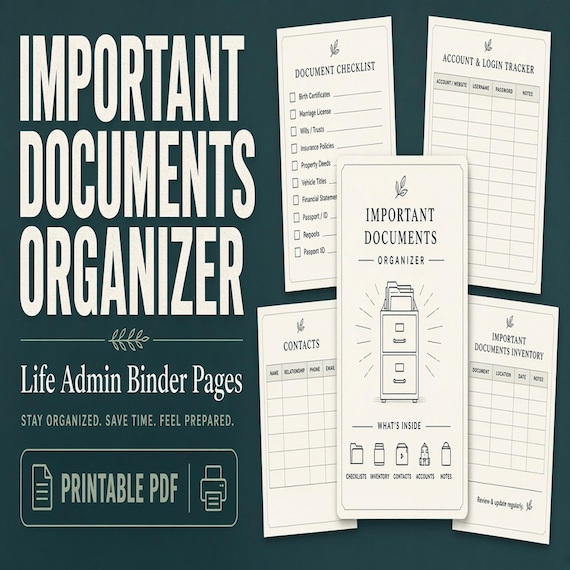
Use a home maintenance binder when you need repair schedules, warranty dates, and contractor follow-up for the house itself. Use an important-documents organizer when the job is mapping where deeds, insurance, and household records live. Use a family emergency binder when sitters and caregivers need medical contacts and a home plan, not a guest checkout card.
Use a cleaning-business forms bundle when you sell cleaning services and need an inquiry, a walkthrough, an estimate, and an invoice. Use a bounce-house or event-rental checklist when the turnover is equipment leaving a warehouse, not a guest leaving a bedroom. Use a pet emergency binder when the job is vet contacts and sitter notes for an animal. A pet line on the house-rules page is not a pet care plan, even if the rental allows pets.
Pick the smallest download that matches the missing job. Do not paste guest Wi-Fi into a family emergency binder, and do not ask a cleaner to reconstruct a house manual from an invoice template. If you only needed a place to record one broken lamp, the maintenance log in this packet is enough. If you need the whole repair history of the house, switch files.
- House repairs and warranties belong in the home maintenance binder.
- Record locations belong in the important-documents organizer.
- A cleaning company's estimates and invoices belong in the cleaning forms bundle.
- Equipment rental resets and pet care plans have their own downloads.
Print both packets and keep the blank copy clean
Before the next arrival, print the guest booklet and read it as if you had never seen the unit. Can you find Wi-Fi, checkout time, parking, and a phone number in under a minute? If not, cut words until you can. Then hand the cleaner the checklist, the inventory page, the restock page, and any open maintenance line. Ask them to mark what they finished and what was short.
After that turnover, update the workbook from their marks. Do not leave corrections only on a paper scrap in the supply closet. Change the Wi-Fi page the day the password changes. Change the checkout page the day the listing time changes. A welcome book that disagrees with the listing creates the message you were trying to avoid.
Return to the blank PDF and the blank workbook when you start another property, or when this property's season changes enough that the old local notes are stale. The next copy should start from the master, not from a file that still has last month's door note and a closed restaurant. Follow the license note for the blank files. They are for the purchasing household or business, not a packet to redistribute.
The whole setup is smaller than it looks. Confirm the files. Split guest pages from cleaner pages. Write only the facts you have checked. Print a booklet a guest can use in the first minute, and a packet a cleaner can mark before the next check-in. Then put the blank master away so the next stay starts clean.
- Read the guest booklet once for Wi-Fi, time, parking, and a phone number.
- Update the workbook from the cleaner's marked packet.
- Change printed pages the same day a password, time, or rule changes.
- Start the next copy from the blank master.
Printables used in this guide
Instant downloads from the SteadyStackStudio Etsy shop.
Home Maintenance Binder Printable
A practical home maintenance checklist for homeowners and renters who want repairs, warranties, utilities, and service contacts…
Important Documents Organizer
A practical important documents organizer for busy households that need one map for IDs, certificates, policies, records, and…

Cleaning Business Forms Bundle
Cleaning business forms bundle for residential cleaners and small cleaning companies: 26-page fillable PDF with client intake…
Family Emergency Binder Printable
Family emergency binder for households: 28-page fillable PDF with household profile, emergency contacts, medical info pages…