Small Business Templates · Jul 24, 2026 · 12 min read
Cut Flower Harvest Workflow: Match Stem Counts to Bouquet Recipes, Orders, and Market Sales
A practical way to turn recorded harvests into repeatable bouquet recipes, reserve stems for confirmed orders, plan market quantities, and close each sales day with useful notes.
Confirm what the current flower-farm planner includes
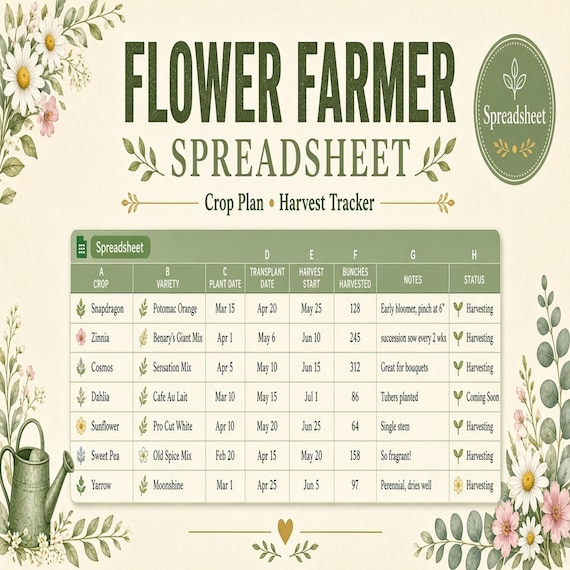
Start with the current product details instead of assuming that every farm spreadsheet covers the same jobs. The featured download is described as an 18-page printable planning workbook, an editable Word version, and an Excel workbook with variety, seed, succession, bed, harvest, bouquet, order, market, and sales trackers. It also lists crop-review and season-closeout pages plus a plain-language setup guide with sample categories. The files arrive in one ZIP folder as an instant digital download; no printed workbook or other physical item is shipped.
This guide concentrates on the harvest-to-sale portion of that larger system. You do not need to complete every crop-planning page before testing the harvest, bouquet, order, market, and sales flow. Confirm that US Letter PDF, DOCX, and Excel files work with the devices, software, printer, and working style available to you. The planner organizes records; it does not supply agronomic, pesticide, food-safety, tax, accounting, pricing, yield, or profitability advice. Use your own verified practices and qualified local guidance for those decisions.
- Check the current 18-page, PDF, Word, Excel, ZIP, and digital-delivery details.
- Open the setup guide and compare the downloaded folders with the current listing.
- Test the harvest-to-sale pages before committing the whole season to the system.
- Keep production, handling, pricing, and compliance decisions with the appropriate sources.
Define the harvest-to-sale job before editing the file
Write the handoff you want the records to support: a harvest becomes an available stem count, available stems become planned bouquets or other approved products, confirmed orders receive their share, the remaining quantity becomes a market plan, and the sales record closes the loop. That sequence gives each page one job. It also makes it easier to spot a number that changes without a documented reason.
Save the purchased files unchanged in a clearly labeled archive folder, then create a dated working copy for the current season. Decide which file will be the master record. The PDF can serve as a field or packing worksheet, while the Excel workbook can serve as the consolidated working record, but only if that division fits the people doing the work. Avoid maintaining two competing totals. When paper is used away from the computer, give one person a specific time to transfer and check it.
- Name the start point, the final decision, and each handoff in between.
- Archive the original download and work from a dated seasonal copy.
- Choose one master record for the quantities the team will rely on.
- Assign responsibility for transferring and checking any paper notes.
Give varieties and harvest lots stable references
A stem count is more useful when everyone knows which flowers it describes. Use the variety name shown on your own source records and pair it with a short internal reference that stays consistent across the variety, harvest, bouquet, order, and market pages. If two flowers have similar common names, do not shorten them until they become indistinguishable. The reference is an organizational aid, not a replacement for the labels and records your operation is required to keep.
Add a harvest-lot reference that fits your own process, such as a combination of date, variety code, and a short sequence. Do not claim that the template generates codes automatically. If the current field layout does not include the reference you need, add a clearly labeled column in a working copy of the editable workbook or use a consistent notes field. Keep the format simple enough to write on a field sheet and find later without translating a private naming system.
- Use the same verified variety wording wherever the flower appears.
- Create a short internal reference only when it improves identification.
- Keep the reference format stable across harvest, recipe, order, and market records.
- Document any added field so another person understands how to use it.
Record the usable harvest with one consistent unit
Choose the counting unit before entering the first quantity. Individual stems may suit one variety, while bunches or another defined unit may suit a different workflow. The important point is to label the unit and avoid comparing unlike quantities as though they were the same. Record what is actually available under your own approved quality and handling process rather than copying a forecast into the harvest log as a completed result.
Keep harvested, usable, reserved, and unavailable quantities conceptually separate. If your process reviews waste or loss, record it without silently subtracting it from an earlier number. A dated note can explain that a count was corrected, regraded, or moved to another approved use. This is not a universal grading method; it is a way to preserve the reason behind a changed total so a later bouquet or sales comparison begins with the quantity your team actually had.
- Label every quantity with its unit instead of relying on memory.
- Enter observed available quantities rather than treating a plan as a harvest result.
- Keep unavailable or wasted material visible when it matters to the review.
- Date and explain corrections instead of overwriting a number without a note.
Turn approved bouquet designs into repeatable recipe records
A bouquet recipe should describe a design you have already chosen and tested, not invent a universal formula for every flower or market. Give the design a clear name and version, then record the stem units and components that your approved sample actually used. Add only the preparation, packaging, size, or presentation notes that belong in your own operation. If a recipe changes materially, create a new version rather than altering the old record after it has already been used for an order or market plan.
Build one representative recipe first. Assemble it with the real materials, compare the finished result with the intended size and appearance, and correct the record while the test is in front of you. Keep optional substitutions separate from the standard recipe and approve them through your normal process. A vague note such as “use similar flowers” is difficult for another person to repeat; a named, reviewed alternative is easier to plan and evaluate.
- Name and version each approved bouquet design.
- Record the actual units used in a representative finished sample.
- Keep substitutions explicit rather than hiding them inside the standard recipe.
- Start a new version when a design change would affect planning or comparison.
Compare recipe needs with stems actually available
Place the available harvest count beside the approved recipe requirements before promising a finished quantity. Work variety by variety and unit by unit. If one bouquet uses several components, the component with the smallest supported output limits how many complete bouquets that version can make. Do the comparison from the quantities in the current records, not from an ideal harvest or a count that has already been reserved elsewhere.
Leave a buffer only when your own method calls for one, and label it so the apparent difference is not mistaken for missing stock. Do not describe the workbook as calculating availability unless you verify that behavior in the current file. The comparison can be made manually with the supplied trackers. The goal is a checkable decision: how many approved finished pieces can be prepared from the recorded stems, what remains unassigned, and which shortage requires a revised plan.
- Compare each recipe component against the same unit in the harvest record.
- Use the limiting component to set a realistic finished quantity.
- Exclude stems already reserved for another confirmed use.
- Label buffers, substitutions, and unresolved shortages instead of burying them in the total.
Reserve inventory for confirmed orders before market planning
Use the order tracker to separate confirmed commitments from inquiries, tentative requests, and general market hopes. Decide what “confirmed” means in your own business, then apply that definition consistently. For each confirmed order, connect the customer-facing order reference to the internal bouquet recipe, quantity, agreed fulfillment details, and the stems reserved from the current available record. Keep private customer information no broader than the team and system genuinely need.
Mark a reservation in the master record as soon as the order reaches the approved status, and release it promptly if the status changes under your policy. If the supplied page does not use the same status language as your workflow, customize the editable working copy rather than expecting staff to remember a verbal translation. The market quantity should be planned only after confirmed commitments have been accounted for, so the same stems are not quietly promised twice.
- Define the order status that authorizes an inventory reservation.
- Connect each reservation to a recipe, quantity, and internal order reference.
- Collect and expose only the customer details needed for the agreed job.
- Release or revise reserved quantities when the approved order status changes.
Prepare the market sheet from sellable finished quantities
Build the market plan from finished quantities that the recorded harvest and approved recipes can support after orders are reserved. List each product or bouquet version in the same wording used on its recipe record, add the quantity intended for the event, and identify any quantity held for another approved purpose. Keep loose stems, finished bouquets, and other products in separate units so the opening total remains understandable.
Print or export the market page only after the plan is approved, and place a date or event name on the copy. If quantities change during packing, update the master and replace the market copy rather than carrying two versions. The page should make setup and closeout easier; it is not a substitute for required sales, tax, handling, labeling, or business records. Confirm those obligations through the appropriate local and professional sources.
- Plan from supported finished quantities, not from an unverified sales target.
- Use the same product and recipe names on the market and production records.
- Label the event and version so the current sheet is unmistakable.
- Replace superseded copies when packing changes the approved quantity.
Keep price decisions separate from the sales log
Approve prices through the method appropriate for your business before entering the market plan. The featured download can organize market and sales records, but its listing expressly says it does not provide pricing, tax, accounting, yield, or profitability advice. Use one current price list for the event and make sure the sales sheet, display labels, and checkout reference agree. A last-minute change should be documented rather than applied to only one place.
During the event, record the transaction detail needed for your own closeout without turning the flower planner into full accounting software. Keep discounts, bundles, returns, taxes, payment fees, and other adjustments distinct when they matter to your records. If detailed cost and margin calculations are the real gap, use a dedicated pricing or accounting system and carry only the approved price or summary back to this workflow.
- Set prices outside the harvest calculation and record the approved version.
- Keep the market sheet, display labels, and checkout reference aligned.
- Document event changes instead of editing one copy silently.
- Use an appropriate dedicated tool when full costing or accounting is required.
Reconcile sold, unsold, held, and wasted quantities after each market
Close the event while the physical quantities and notes are still available. Begin with the approved opening amount for each item, then record sold quantities and classify what remains according to the statuses your operation actually uses. Keep unsold finished pieces, held orders, returned display stock, loose stems, and unavailable material distinct when combining them would make the next decision unclear.
Compare the resulting total with the physical count and investigate differences before carrying numbers forward. A correction should show what changed and who reviewed it, not merely force the spreadsheet to balance. Follow your own approved handling, donation, reuse, or disposal practices for remaining flowers. The planner records the outcome; it does not decide whether material remains suitable for a particular use.
- Start closeout from the approved opening quantity for that event.
- Use clear statuses for sold and remaining quantities.
- Investigate unexplained differences before updating future availability.
- Record the disposition without turning the spreadsheet into handling guidance.
Review yield, waste, recipe, order, and sales patterns together
Use a short review to connect the records without assuming that one number explains another. Compare the recorded harvest with usable quantities, note which bouquet versions were actually prepared, check confirmed orders against fulfillment records, and compare each market plan with its sales closeout. The product description specifically frames yield, waste, and sales patterns as information to review before a later succession or season, but the meaning must come from your own verified context.
Write observations before conclusions. A recipe may have been limited by one component, a market quantity may have changed during packing, or an event result may reflect circumstances the spreadsheet cannot capture on its own. Record relevant facts that you can verify, assign a follow-up where information is missing, and take agronomic, production, pricing, or business decisions through the sources responsible for them. A modest, dated review is more useful than a confident explanation built from incomplete records.
- Compare harvest, finished production, orders, market plans, and closeout in sequence.
- Separate recorded facts from interpretations and future decisions.
- Flag missing information instead of filling gaps with a guess.
- Carry only reviewed changes into the next plan or season.
Close the season without overwriting the reusable master
Use the included crop-review and season-closeout pages to summarize the period that just ended, then preserve the detailed records behind that summary. Record the date range, the files reviewed, unresolved corrections, recipe versions still in use, and any decisions that have been approved for a later season. Keep the closeout tied to the dated seasonal copy rather than editing the untouched download.
Archive the completed workbook and supporting paper notes according to the privacy, business, and record-retention needs that apply to you. Create the next season from a clean working copy, then carry forward only the variety references, recipe versions, categories, or process notes that remain current. Do not copy old quantities, stale orders, or unverified assumptions simply because they already occupy a row. The clean reset protects the history while giving the next season a trustworthy starting point.
- Tie the closeout to a clear season or date range.
- Preserve the detailed records that support the summary.
- Start the next period from a clean copy of the reusable files.
- Carry forward only reviewed references, recipes, and process decisions.
Choose the flower-farm planner or a more focused neighboring tool
Choose the featured flower-farm planner when the real job spans several connected records: varieties and seeds, crop and bed planning, harvests, bouquet recipes, orders, markets, sales, and a season review. Its current PDF, Word, and Excel package is suited to a small grower, market gardener, or bouquet business that wants one customizable system and understands that local production and business decisions remain outside the template. Skip it if you already have a reliable master system or need software automation the listing does not promise.
Choose the florist stem-count spreadsheet when event recipes, delivery notes, and setup-day work are the main task. Choose the seed-starting spreadsheet when sowing windows, germination, tray records, and transplanting are the immediate gap. A product-pricing calculator addresses cost and margin math, while existing price-tag holders or maker-market fixtures address the physical display rather than the harvest record. Garden clipart is artwork for labels and designs, not a crop or sales tracker. Compare the current previews and file details, then choose the smallest existing download that completes the specific job.
- Flower-farm planner: connected crop, harvest, bouquet, order, market, and sales records.
- Florist stem-count tool: event recipes, delivery notes, and setup-day coordination.
- Seed-starting tracker: sowing, germination, tray, and transplant records.
- Pricing, display, or artwork files: separate tools for separate jobs.
Printables used in this guide
Instant downloads from the SteadyStackStudio Etsy shop.
Flower Farm Planner Spreadsheet
The pages are designed to help you prepare, record decisions, and keep the next action visible without building your own system…
Florist Spreadsheet
Florist stem count spreadsheet for wedding and event florists: Excel-first workbook with stem inventory, wedding recipe cards…
Seed Starting Spreadsheet
Seed starting spreadsheet for home gardeners: Excel-first workbook with seed inventory, planting calendar, germination log (auto…
Product Pricing Calculator Spreadsheet
Product Pricing Calculator Spreadsheet with Small Business Profit Margin, Cost of Goods, Wholesale and Retail Price Excel PDF…