Small Business Templates · Jul 27, 2026 · 14 min read
Charcuterie Order Workflow: Quote, Prep, Pickup, and Grazing Table Setup
A practical workflow for turning a charcuterie inquiry into a confirmed order, checked quote, ingredient and prep plan, clear pickup or delivery handoff, and organized grazing-table setup.
Confirm the download fits the work you need to organize
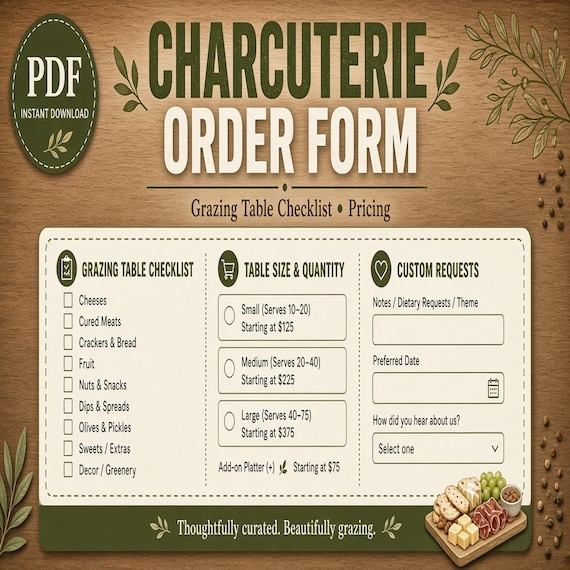
Begin with the current file list rather than assuming the download is a complete catering system. The featured SteadyStackStudio charcuterie kit is described as a ZIP containing an Excel order, pricing, and prep tracker; a printable order and prep checklist PDF; editable label or menu card templates in PPTX format; a quick-start PDF; and a README with the license note. It is a digital planning kit. No food, board, serving piece, printed card, delivery, setup labor, or custom service is included.
Before checkout, inspect the latest preview images and confirm that XLSX, PDF, PPTX, and ZIP files work with the devices and software you intend to use. After downloading, open the quick-start guide and README first. Keep the original ZIP and one untouched extracted folder, then create a separate working folder for each order. If a particular formula, field, card size, or page layout is essential, verify it in the current previews and files instead of inferring it from the product title.
- Check the current Etsy previews, included formats, digital-delivery note, and license before purchase.
- Keep the original ZIP and one clean master copy of every supplied file.
- Open the XLSX and PPTX in the software you will actually use before accepting the first job into the system.
- Remember that templates organize a process; they do not supply food, equipment, staffing, training, or approval to operate.
Turn the inquiry into one controlled order record
Create one working record as soon as an inquiry becomes serious. Give it a clear order reference and record the customer contact, event date, requested handoff time, location, expected guest information, requested service format, and current status. Separate facts the customer has confirmed from questions that are still open. A date mentioned in a message is not the same as an approved booking, and an estimated guest count should not quietly become the final quantity used for purchasing.
The workbook may organize many of these details, but inspect the actual file before assuming that every suggestion in this guide is a prebuilt column. Add only the fields your business is prepared to maintain. Keep calls, messages, quote versions, and scattered notes from becoming competing versions of the order. When a detail changes, update the controlled record and mark the old information as superseded so the person preparing food, printing cards, arranging pickup, or traveling to the venue sees the same current plan.
- Assign one order reference that follows the job from inquiry through closeout.
- Mark each important detail as requested, confirmed, changed, or still open.
- Use one current record instead of several unconnected message threads and handwritten lists.
- Keep unnecessary personal information out of a reusable template and follow your established privacy practices.
Define the service format before choosing a board size or quantity
Clarify what the customer is actually requesting before calculating a quote. A pickup board, individually packed items, a delivered board, and an on-site grazing table create different work even when the ingredient theme sounds similar. Confirm whether the order is intended as a light addition, a central food display, or another role within the event plan. Also confirm what your business genuinely offers; do not let a template turn a request into a service you have not priced, tested, insured, or approved.
Use the board sizes, recipes, yields, portions, and service standards your business has already tested and is permitted to use. Avoid copying a generic per-person number into the tracker and treating it as a guarantee. Guest information, event duration, menu mix, other food, presentation style, waste allowance, and the business's own tested method can all affect the plan. Record the assumption used for the quote, then revise the quantity only through the same approval process used for the rest of the order.
- Name the service format: pickup, delivery, delivered display, or staffed setup only if that option is actually offered.
- Use your approved product sizes and tested yields rather than guessing from a photograph.
- Record the role of the order within the event so the estimate is not based on guest count alone.
- Treat a change in format, count, location, or setup scope as a quote review, not a minor note.
Record ingredient requests without promising an allergen-free result
Give customer-reported preferences, restrictions, and allergy questions a visible place in the order review, but do not turn a note in a spreadsheet into a safety guarantee. Ask what the customer is requesting, record the exact wording, and route the question through the person responsible for menu approval and food handling. Confirm ingredients and manufacturer information from current sources. If your workspace, suppliers, equipment, transport method, or setup cannot support the request under your approved procedures, say so before the order is accepted.
Keep substitutions under control. A replacement cheese, meat, cracker, dip, garnish, or packaged item can change ingredients, labels, cost, availability, and presentation. Update the order, quote, shopping plan, prep notes, and customer-facing card wherever the change matters. Follow current food-safety guidance, local requirements, manufacturer directions, and qualified professional advice for storage, preparation, cross-contact, labeling, transport, display, and service. The template is not food-safety training or compliance approval.
- Record the customer's words accurately and distinguish a preference from a reported allergy or restriction.
- Confirm ingredients and substitutions from current product information rather than memory.
- Do not promise an allergen-free result unless the responsible business is genuinely able and authorized to make that promise.
- Escalate any request that the approved workspace, suppliers, handling process, or local rules do not support.
Build a quote that exposes every important assumption
Start the estimate from the approved service format and current ingredient costs. Depending on the job your business performs, the full cost review may include ingredients, expected usable yield, sourcing time, preparation and assembly labor, packaging, boards or other serving materials, consumables, printed pieces, delivery travel, venue access time, setup, collection or teardown, rentals, payment costs, overhead, taxes, and a planned margin. These are review prompts, not a claim that every item is already a dedicated field in the supplied workbook.
Enter a small, easy-to-check example before relying on the pricing tracker for a full event. Verify units, quantities, formulas, decimal placement, and any copied rows. Compare the result with a manual calculation and with the current prices your business actually pays. Save the assumptions with the quote: order format, size or quantity, guest estimate, delivery area, setup scope, included materials, exclusions, and the date through which the estimate remains usable under your reviewed policies. A calculator can organize inputs, but it cannot know whether an omitted cost or business assumption is reasonable.
- Use current costs and one consistent unit system.
- Separate food cost from labor, packaging, travel, setup, overhead, taxes, fees, and other applicable costs.
- Test the workbook with an example you can calculate by hand before using it for a customer quote.
- Write the quote assumptions and exclusions clearly enough that a second person can understand the total.
- Review formulas and business assumptions before sending any number to a customer.
Freeze an approved version before purchasing or preparing
Send the customer a clear summary through the communication and agreement process your business already uses. The summary should identify the current service format, size or quantity, menu or item scope, handoff method, event date and time, location, setup responsibility, price, and any open condition that must be resolved. The supplied planning files do not replace a contract, invoice, payment system, deposit policy, cancellation terms, insurance requirements, or legal review.
Once the job is approved under your normal process, mark one version as the active order. Give later changes a date and a decision: accepted with no price change, accepted with a revised quote, or declined because the request is no longer workable. Update every dependent page after an approved change. Buying from an old ingredient list while printing a new menu is exactly the kind of mismatch a controlled order should prevent. Keep superseded files in a clearly marked archive rather than beside the active packet.
- Do not purchase ingredients or begin custom prep from a draft that has not passed your normal approval process.
- Give every accepted change a date, approver, price decision, and updated active version.
- Remove superseded quotes, menus, and prep lists from the active working folder.
- Use reviewed contracts, policies, invoicing, and payment tools separately where the business requires them.
Convert the approved order into purchasing and prep steps
Build the shopping and preparation plan only from the approved order. List each approved item, the quantity or yield basis used by your business, the purchase unit, the amount already on hand if your records support that check, the person responsible for sourcing it, and the confirmation status. Combine duplicate ingredients carefully so the same item is not purchased twice under separate board sections, while preserving any distinction that matters for ingredients, storage, presentation, or customer requests.
Then arrange preparation in a sequence the team can follow. Useful steps may include receiving and checking supplies, completing permitted advance preparation, preparing packaging or service pieces, assembling at the approved time, printing cards, loading, handing off, and closing the job. Assign an owner and completion check to every critical step. Decide timing, storage, temperature control, transport, and display according to current official guidance, local rules, product directions, trained practice, and the actual menu. A checklist can reveal an unfinished task; it cannot decide when food is safe.
- Generate the purchase plan from the current approved order, not from an earlier estimate.
- Keep purchase units and working units explicit so conversions can be checked.
- Give every prep step an owner, required timing, and completion check.
- Follow current qualified guidance for preparation, storage, transport, display, and service decisions.
- Pause when a substitution or shortage changes the approved scope instead of improvising silently.
Use editable cards for clear communication, not as a substitute for required labels
The current kit describes editable label or menu cards in PPTX format. Protect the supplied master and edit a working copy for the order. Decide what each card is meant to do before adding text. A customer-facing menu card can identify the approved selection. An internal prep or container label can help the team match an item to the order. A pickup card can support a handoff. Do not force customer copy, internal notes, handling instructions, prices, and every required statement into one crowded layout.
Use factual wording from the current approved order and other sources your business relies on. Required ingredient, allergen, business, food, or legal information must appear wherever current rules and qualified guidance place it; an attractive menu card does not replace that system. Proof the longest realistic item name and the smallest essential text before printing a set. Check fonts, line breaks, margins, clipping, paper size, scale, contrast, and the reopened export. Print one physical sample and read it at the distance and lighting where it will be used.
- Keep one blank PPTX master and create a clearly named working copy for each order.
- Separate customer-facing menu text from internal preparation and handoff notes.
- Take factual wording from the current approved order and required qualified sources.
- Test the densest card in print before producing the full set.
- Do not treat a decorative card as food-safety, ingredient, allergen, or labeling compliance.
Design a pickup handoff that can be checked in minutes
For pickup orders, confirm the pickup date, time window, location, customer or authorized recipient, order reference, package or board count, and the business's approved handoff instructions. Make the order easy to identify without exposing unnecessary personal details on outward-facing labels. Check that the final package matches the active order and that any customer-provided item or returnable piece is handled under the business's established process.
Prepare the approved storage, transport, serving, and time guidance the business is responsible for communicating, and present it through the reviewed method used for that order. Do not improvise safety directions at the door or copy a generic statement into every job. Record completion under the business's privacy and retention practices. The goal is a calm, accurate handoff: correct order, correct recipient, correct current instructions, and no unresolved question being silently passed to the customer.
- Confirm the recipient, time window, location, order reference, and item count before the handoff.
- Match the physical order against the current approved record rather than relying on appearance alone.
- Use only the storage, transport, and serving guidance reviewed for the actual order.
- Keep private details off outward-facing labels unless they are genuinely needed and appropriately handled.
- Escalate an unresolved safety, timing, or substitution question before releasing the order.
Plan delivery and grazing-table setup as separate scopes
Delivery and on-site setup should not be treated as interchangeable. For delivery, confirm the address, route, arrival window, recipient, unloading point, parking or access conditions, building instructions, travel allowance, and what happens after the order is handed over. For a grazing-table setup, also confirm the venue contact, room and table location, usable surface, setup window, layout area, nearby event activity, agreed serving pieces, signage, waste plan, and which party supplies each required item.
Create a simple layout based on the approved menu and the real dimensions available to the business. Keep the order record, prep plan, pack list, and card set connected to that layout. Confirm venue rules and current food-handling requirements with the responsible parties. If site conditions differ from the approved plan, pause the affected step and contact the authorized decision-maker. The planning kit can keep contacts and tasks visible, but it cannot approve a venue, certify a display, choose safe holding conditions, or replace trained judgment.
- Price and approve delivery separately from on-site setup when they require different work.
- Confirm access, unloading, table location, setup window, contacts, and supply responsibilities before travel.
- Use real dimensions and the approved order when sketching the display.
- Check venue and food-handling requirements with the responsible parties rather than assuming a previous event's rules apply.
- Stop and escalate when the site cannot support the approved plan.
Pack and arrive from one current event packet
Assemble one current packet before loading: approved order, latest quote or scope summary, customer and venue contacts, prep status, item count, pack list, delivery or pickup details, layout note when needed, and the final cards. Remove drafts from active use. Group physical items by the sequence in which they will be unloaded, set up, checked, and handed over rather than only by the shelf where they were stored during preparation.
Run a load-out check and an arrival check. A box marked complete at the prep location is not proof that it reached the venue or pickup point. Compare the physical order with the pack list and active record at both moments. Keep any item requiring special handling under its current approved instructions. Brief every helper on the current version, point of contact, boundaries of the agreed service, and who may approve a change. A clear packet reduces guessing, but it does not replace safe transport, suitable equipment, insurance, training, or emergency procedures.
- Carry one current packet and keep superseded versions out of active use.
- Pack by unload, setup, service, handoff, and closeout sequence.
- Check item counts at load-out and again on arrival.
- Tell helpers who may approve a change and where unresolved questions should go.
- Follow current approved handling and transport instructions throughout the job.
Close the order and improve the clean process copy
After handoff or setup, reconcile the record while the details are still clear. Note the final scope, approved changes, actual ingredient and supply costs you are permitted to retain, prep or travel time under your business's method, items returned, and any difference between the estimate and the completed job. Handle leftovers, returns, disposal, and retained food only under current qualified guidance and your approved process; do not let a spreadsheet status decide what can be reused.
Store the completed order apart from the blank master. Protect customer, financial, payment, incident, and health-related information under the business's privacy, accounting, insurance, and retention policies. Remove customer details before turning a useful lesson into a clean checklist improvement. If the quote omitted parking, a label was hard to read, or a supply owner was unclear, update the reusable working method for future jobs without overwriting the original downloaded files or changing a completed order's history.
- Reconcile the estimate and completed job using records the business is permitted to keep.
- Separate the completed order folder from untouched masters and future working copies.
- Protect private and financial information according to established policies.
- Carry process lessons into a clean reusable checklist without copying customer details.
- Preserve the original download and the completed record instead of rewriting either one.
Choose the charcuterie kit or the adjacent template that matches the job
The featured charcuterie kit is the strongest fit when the immediate need is a connected Excel order, pricing, and prep tracker; printable order and prep checklist pages; editable PPTX label or menu cards; and quick-start instructions for a charcuterie board or grazing-table business. Review the latest previews, file list, software requirements, digital-delivery statement, and license before opening Etsy. Skip it if you need physical food or boards, custom catering service, live point-of-sale software, an ordering website, a contract, food-safety training, licensing guidance, or professional compliance review.
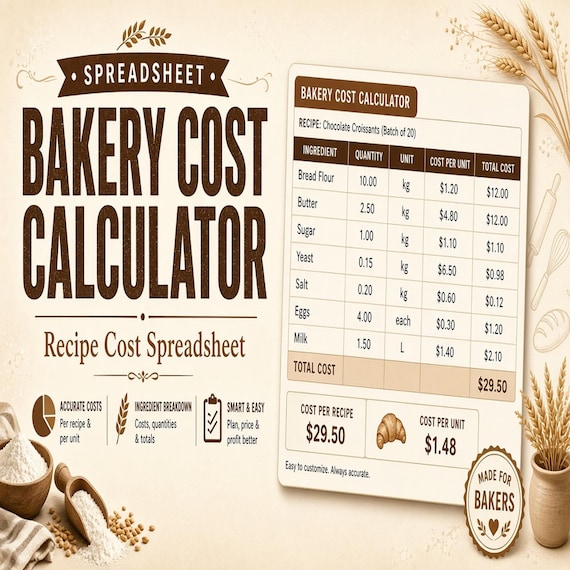
Choose the bakery calculator when recipe costing, batch scaling, and bakery-order margins are the main task. Choose the general product-pricing calculator when the business sells several product types and needs broader costing and margin comparisons. The mobile bar kit supports drink orders, batch planning, and bar prep; the balloon-garland tracker supports event specifications and installation; the coordinator workbook supports a full pro timeline; and the florist tracker supports stem counts, floral recipes, and delivery. Select the smallest current download that matches the record you actually need to maintain, then set it up and test it before adding another tool.
- Use the charcuterie kit for connected board or grazing-table order, quote, prep, card, and handoff organization.
- Use a food-specific costing tool when recipe or batch calculations are the central gap.
- Use an adjacent event template only when its service and recordkeeping job match the work being sold.
- Do not purchase when the current previews, formats, and scope do not show a workable fit.
- Remember that every listed option is a digital template, not physical supplies, staffing, training, or professional approval.
Printables used in this guide
Instant downloads from the SteadyStackStudio Etsy shop.
Charcuterie Order Form
Plan board sizes, ingredient prep, customer requests, pickup details, labels, and quote estimates in one kit.
Bakery Pricing Calculator Spreadsheet
Stop underpricing cakes, cookies, and cottage bakery orders. This is an instant digital download designed for buyers who want a…
Product Pricing Calculator Spreadsheet
Product Pricing Calculator Spreadsheet with Small Business Profit Margin, Cost of Goods, Wholesale and Retail Price Excel PDF…
Mobile Bar Business Forms
Plan event drinks, batches, shopping lists, garnish prep, and bar-service notes without messy one-off spreadsheets.