Beauty & Wellness Forms · Aug 30, 2026 · 17 min read
Hair Extension Consultation Workflow: Record Goals, Install Details, and Maintenance Timing
A practical setup guide for hair-extension stylists who need one client path from consultation notes to install details, maintenance timing, aftercare reminders, and follow-up.
Confirm what the current hair-extension download is built to organize
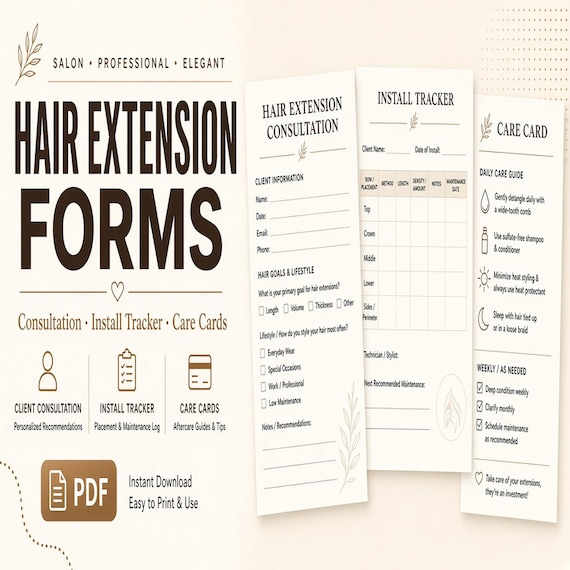
The current SteadyStackStudio hair-extension kit is a digital template set for hair-extension stylists, salon owners, mobile stylists, and other beauty service providers who keep consultation and follow-up records. The listed files are a printable PDF workbook or forms, an editable DOCX template, an Excel XLSX tracker, and a README or license note. The files arrive as an instant digital download. No physical item is shipped.
The listing describes a kit for consultation notes, install details, maintenance timing, aftercare reminders, and client follow-up. Review the current previews before choosing it. Confirm that the printed pages have enough writing space, that the DOCX wording can be edited on the computer you actually use, and that the spreadsheet can hold the appointment and status notes your studio already tracks. Do not assume extra pages, automatic scheduling, live inventory, hair-ordering software, or a client portal. Those features are not part of the current description.
This kit can support a paper-and-spreadsheet workflow. It is not a substitute for professional training, manufacturer instructions, a contract, a payment system, or legal review. Customize every page for your business before a client sees it. Keep required consents, deposits, photo permissions, and licensing records in the systems your business already uses for those jobs.
- Use the PDF when you need a printable consultation, install, or take-home page.
- Use the DOCX when you need to change headings, prompts, or studio wording before printing.
- Use the XLSX tracker for appointment dates, status, and follow-up that change over time.
- Keep the README with the download so license and use notes stay with the files.
- Leave contracts, payments, hair orders, and required legal forms in their approved places.
Choose the extension-client path instead of a generic beauty intake packet
A hair-extension record and a general beauty intake form can both collect a name and an appointment date, but they answer different questions. Extension work usually spans several visits: a consultation, an install, later maintenance, and home care. The hard part is keeping those visits connected so the next stylist, or the same stylist weeks later, can see what was planned, what was installed, and when the client is due back.
Use this guide when the immediate task is building that connected path. Use the companion lash guide when the harder task is choosing intake, consent, and aftercare pages for lash services. A salon that offers both services may need both records, but they should not compete. Lash aftercare and extension maintenance are not interchangeable, and mixing them on one vague beauty form makes the next visit harder to reconstruct.
Define the handoff before entering real names. The consultation record should show what was discussed and recommended. The install record should show what was actually placed. The tracker should show the next agreed visit and its status. The maintenance card should show the home-care reminders the client left with. If those four facts live in different notebooks, texts, and memories, the paperwork is not doing its job.
- Consultation record: goals, hair history, lifestyle fit, and the recommended plan.
- Install record: what was placed, by whom, on which date, and any notes needed for later work.
- Tracker: next visit, current status, and follow-up that still needs an owner.
- Maintenance card: the take-home reminders the client actually received.
Freeze one consultation record before ordering hair or booking the install
Install details will keep moving if the consultation is still a hallway conversation. Before anyone orders hair or blocks a long chair time, create one dated consultation record for that client. Capture who met, when they met, what result the client asked for, and what the stylist recommended after seeing the hair in person. If inspiration photos were reviewed, note that they were reviewed and where those photos are stored under the studio's photo process. Do not treat a screenshot on a phone as the official plan.
Record the version or date of the plan beside the recommendation. If the client later asks for more length, a different method, or a new color story, treat that as a visible revision rather than typing over the first notes. The person who orders hair and the person who installs it need to know which plan is current. Keep any signed agreement, deposit, or cancellation term in the business's normal client file; the consultation page can point to that decision without becoming the contract.
Do not combine different jobs under a label such as extension consult. A first-time length consult, a density-only consult, a color-blend consult, and a move-up-only visit are not the same appointment. If the chair time, hair order, or aftercare would change, the record should distinguish the visit type. Give the client one stable reference, such as a short client code plus the consultation date, that can appear on the form, tracker row, and later install notes.
- Date the consultation and name the stylist who assessed the hair.
- Write the requested result and the recommended plan as two separate facts.
- Mark optional ideas that were discussed but not approved.
- Record who can change the plan and how that change reaches ordering and install day.
Keep hair history, current condition, and goals as separate facts
A useful consultation does more than collect contact details. It documents what the client is starting with and what they want, without collapsing those into one impression. Hair history can include previous extension experience, recent color or chemical work, and the client's usual wash and heat routine, at the level your training and studio process require. Current condition is what you observe in the chair: density, texture, length, scalp comfort, and anything the client reports about breakage, shedding, or sensitivity. Goals are the result they came in asking for, such as length, volume, a blend, or an event date.
Keep those three areas distinct on the page. A client can want dramatic length while currently washing daily, exercising often, or wearing tight updos. That is not a reason to argue on the form. It is a reason to record both the goal and the lifestyle so the method conversation is honest. Likewise, previous extensions that slipped, matted, or felt too heavy should be written as the client's experience, not as a diagnosis. If a medical, surgical, or other health question arises, stay inside the studio's professional limits and do not use a template as clinical advice.
Leave space for stylist observations that another permitted team member could understand later. A note such as fine at the nape, wants length for a wedding in October is more useful than looks good for extensions. Do not invent measurements, porosity tests, or tension scores that the downloaded pages do not provide. Use the writing space that is actually on the form, and add only the extra detail your studio already records elsewhere if the page cannot hold it.
- Separate client-reported history from stylist observations.
- Write goals in plain language the client would recognize.
- Note habits that affect maintenance, such as wash frequency, heat, swimming, or frequent updos.
- Keep health, medical, and safety decisions in qualified professional judgment, not in a downloaded prompt.
Match method, maintenance, and lifestyle before install day
Hair extensions are not one service. The method, the amount of hair, the maintenance rhythm, and the home-care load have to fit the person in the chair. A consultation that only records a desired Instagram result leaves the hard conversation for install day, when hair may already be ordered and time is already blocked. Use the consultation page to write the recommended method, why it fits, and what the client would need to do between visits.
Maintenance is part of the recommendation, not an afterthought. Installed methods generally need a later visit to reset attachments as natural hair grows. How often that visit occurs depends on the method, the client's growth, how the hair is worn, and the stylist's trained process. Do not copy a generic interval onto every card. Write the interval the stylist is actually recommending for this client, and say whether that date is a move-up, a tightening, a tape replacement, a full reinstall, or another visit type your studio uses. If the client cannot return on that rhythm, record that constraint before anyone orders hair.
Budget belongs in the same conversation, but the template is not a price list. If a preferred method is outside the client's range, note the alternative that was offered and which option the client chose. Avoid changing professional pricing on the form to make a plan look possible. The record should show the plan that was accepted, the maintenance the client said they could keep, and any home-care products or habits the stylist asked them to follow. Send the client home with a clear next step: order hair, hold a deposit under the studio's existing process, book install day, or wait.
- Write the recommended method and the reason it fits this hair and lifestyle.
- Record the maintenance visit type and the date range the stylist set for this client.
- Note whether the client accepted that maintenance load before hair is ordered.
- Keep quotes, deposits, and payments in the studio's normal money process.
- Do not treat a template interval as a universal rule for every method or client.
Record the install so the next visit does not depend on memory
The install record should describe what was actually placed closely enough that a later maintenance visit can start without reconstructing the work from photos alone. After the consultation plan is accepted, copy only the current plan into the install notes, then update those notes with what happened in the chair. If the final method, amount of hair, color mix, or placement differs from the consult, write the change and why it was made. Do not leave the consult page looking like the install if the two no longer match.
Record the facts your team needs to maintain the work. That often includes install date, stylist, method, amount or row or piece count as your studio measures it, length, color or blend notes, placement notes, and any lot, brand, or internal hair reference the studio already uses. Use the language your team already shares. Do not invent columns the spreadsheet does not have; if a needed detail will not fit, keep it in the studio's existing hair-inventory or client file and put a short pointer on the tracker.
Finish the install notes before the client leaves, or immediately after according to the studio's closing process. A record completed the next morning is more likely to miss a color sandwich, a shorter face frame, or a weft that was left out. If photos are part of the studio's documentation, store them through the approved permission and storage process. The template can note that photos were taken. It should not become a hidden photo album.
- Start from the current consultation plan, then record what was actually installed.
- Include date, stylist, method, quantity, length, blend notes, and placement at the studio's usual level of detail.
- Mark differences from the consult so later visits do not follow an outdated plan.
- Complete the install notes before the details live only in one person's memory.
- Store photos and hair-order documents where the business already keeps them.
Put maintenance timing on a tracker the whole team can follow
The Excel tracker is the right place for information that changes: next appointment, visit type, current status, and follow-up that still needs a reply. It is not a replacement for the consultation page or the install notes. Use one row or record per client, or per active extension plan, according to how the downloaded sheet is laid out. Give that row the same client reference used on the paper forms so a team member can move from tracker to packet without guessing.
Status should be specific. Due, booked, completed, rescheduled, missed, on hold, and retired are different states. A client who skipped a move-up is not in the same position as a client whose hair was removed. Write the next action and the person responsible for it. If the studio texts or emails reminders through another tool, the tracker can show that a reminder is due without becoming the messaging system.
Build the tracker around the visit the stylist set, not around a copied average. Some clients return sooner because of growth, sport, hard water, or hair that is not holding as expected. Some methods are typically maintained on a longer cycle than others. Those ranges are training and product-method decisions, not spreadsheet formulas. When a date changes, keep the original recommended window visible if your process needs that history, and make the new date the current one. Do not silently overwrite a missed visit as if it never existed.
- Use the XLSX file for dates, status, and follow-up, not as the entire client story.
- Connect each tracker row to the same client reference used on the printed pages.
- Name the next visit type instead of writing a vague due soon note.
- Record missed or moved appointments instead of erasing them.
- Keep reminder texts, booking links, and payments in the tools already used for those jobs.
Make the maintenance card a take-home handoff, not a hallway reminder
Aftercare reminders only help if the client leaves with the version that matches the method just installed. Use the maintenance cards for short, current home-care points the studio wants the client to keep: washing guidance the stylist gave, brushing, drying, heat, sleeping, swimming, product cautions, and when to come back. Customize the wording to your trained method and to any manufacturer instructions you follow. A card that still mentions a method the client does not have is worse than no card.
Give the card a job that is different from the consultation form. The consult page is a studio record. The card is a client-facing reminder. Keep the language plain. Avoid filling the card with studio codes, wholesale notes, or internal hair-lot details. If the manufacturer supplies a care sheet, decide whether the studio card is a supplement, a studio-specific summary, or a replacement for that sheet, and do not hand the client two conflicting versions.
Record that the card was given. A tracker note or a check on the install page is enough. If you review home care at the next visit, compare what the client is actually doing with the card they received, then update the next reminder if the stylist changes a recommendation. Do not treat the card as a promise that hair will last a set number of months. Longevity depends on hair quality, method, home care, maintenance attendance, and professional judgment.
- Match the card to the method and home-care advice given at this visit.
- Edit the DOCX before printing so studio name, method, and return timing are current.
- Keep the card short enough to read after the appointment.
- Note that the client received the card, and keep a copy of the version you issued.
- Do not use a maintenance card as a substitute for in-person education or manufacturer guidance.
Give the PDF, DOCX, and spreadsheet different jobs
Keep the original download and README unchanged in a source folder. Make a dated working copy for the studio and preserve a clean master before changing labels or prompts. Decide which copy is authoritative. If several stylists each save a slightly different form, consultation notes and maintenance dates will drift even when every file looks complete.
Use the PDF for pages you want to print as they are, after you confirm the layout at the size you will actually use. Use the DOCX when wording must change: studio name, method names, visit types, or home-care lines. After you edit the DOCX, export or print the client-facing pages from that approved version rather than handwriting a new process onto an old PDF. Use the XLSX tracker for follow-up that needs to be sorted, filtered, or updated without reprinting the whole packet.
Avoid copying every changing date into every format. Connect the files with the client reference, visit date, and current plan date instead. If a maintenance date moves, update the tracker and, if the client already has a card with the old date, issue a corrected reminder according to the studio's process. Two dates in two places, with no owner, is how missed move-ups happen.
- Keep one untouched download, one approved master, and one controlled working copy.
- Edit wording in the DOCX; print stable pages from the approved result.
- Let the spreadsheet hold moving dates and status.
- Use the same client reference across paper and tracker.
- Remove superseded printouts from consultation folders and take-home stacks.
Protect masters, privacy, and wording before real names are entered
Before the first real client is written into the kit, decide where working files live, who can view or edit them, how paper packets are stored, and how completed records are retained or removed under the business's current requirements. Hair-extension files can include contact details, photos, and notes about a person's hair and body. Treat them with the same care you already use for other client records.
Customize the DOCX as a controlled blank, not as a live client file. Remove placeholder language that does not match your services. Add the studio name and the visit types you actually offer. Do not add medical claims, guaranteed results, or legal-sounding waiver language unless a qualified reviewer has approved that wording for your business. The download does not provide legal, medical, health, safety, licensing, tax, or compliance advice, and the buyer is responsible for local requirements and professional-use decisions.
Train with unmistakably fictional details. Walk a fake client from consult to install to a booked maintenance visit, including one change of plan and one missed appointment. Ask another team member to find the current method, the install date, the next visit, and the card version without verbal coaching. If they cannot, fix the labels and the tracker before real names are used. Delete the fictional record when the master and training notes are complete.
- Lock a clean master before anyone customizes pages for the floor.
- Limit access to people who need the records for the service.
- Review client-facing wording against the services you actually provide.
- Practice with fictional names so a setup copy cannot be mistaken for a real client.
- Follow the business's current privacy, retention, and disposal process.
Keep contracts, hair orders, and required consents in their own systems
This kit organizes consultation notes, install details, maintenance timing, aftercare reminders, and follow-up. It does not replace a service agreement, a deposit policy, a photo-release process, a hair-ordering log, or any consent your licensing or insurer expects. If the studio uses a separate waiver or consent, keep that document in the approved legal process and make sure the consultation page does not contradict it. If a prompt on the template overlaps a required form, decide which document is official and remove the duplicate from the working copy.
Hair ordering has its own facts: supplier, texture, color, grams or packs, cost, arrival date, and whether the hair is assigned to a named client. Those facts may sit in a purchasing sheet or supplier account. The install record only needs the details required to maintain the work. Do not turn the consultation form into an inventory system, and do not let an unconfirmed hair order look like an approved install plan.
Payments, tips, product retail, and no-show fees belong in the studio's money tools. The tracker can show that a visit is unpaid or that a reminder is needed only if that is a status the team already uses, and only if storing that note on the spreadsheet fits the studio's privacy process. When in doubt, keep money out of the clinical-looking packet and keep hair-health notes out of the cash drawer.
- Use this kit for consult, install, timing, reminders, and follow-up.
- Keep contracts, consents, deposits, and photo permissions in their approved files.
- Keep supplier orders and hair inventory in the purchasing record.
- Do not let a template prompt stand in for a required legal or licensing form.
- Have a qualified reviewer check any added waiver or medical language before clients see it.
Test one fictional client and decide whether the file set fits
Before using the templates with a booked guest, run one fictional client through the full path. Include a consult with mixed goals, a method recommendation, an install that differs slightly from the consult, a take-home card, a booked maintenance date, and one reschedule. Print the pages at the size you will use on the floor. Check writing space, page breaks, contrast, and whether the client reference remains visible when pages are clipped into a folder.
Open the DOCX and XLSX files on the computers that will edit them. Confirm that saved copies reopen correctly and that the layout in the current previews matches what you expected. If you work from a tablet or phone, test that path too. A form that looks fine on a desktop can be hard to complete at the desk between clients. The tracker should let a front-desk teammate see who is due this week without opening every paper packet.
The featured kit is most suitable for a stylist or small salon that wants printable pages plus an editable tracker and can keep one controlled current copy. Choose a more connected salon platform when you need live multiuser records, online intake, automatic reminders, inventory, or payment tools. A template is a good fit only when it closes a real handoff gap: the consult, the install, the next visit, and the card the client took home. If those four facts are already clear in a system the team trusts, do not add a second packet that will fall out of date.
- Test a consult, an install change, a maintenance card, a booked visit, and a reschedule.
- Ask someone who did not build the setup to find the current plan and next date.
- Use the real printer, folder, desk, and computers.
- Fix duplicate fields, unclear visit types, and conflicting dates before launch.
- Delete the fictional client after the approved master and training notes are complete.
Printables used in this guide
Instant downloads from the SteadyStackStudio Etsy shop.
Hair Extension Consultation Form
A polished template kit for hair extension stylists, salon owners, mobile stylists, and beauty service providers.

Lash Tech Consent Forms
Lash tech forms bundle for lash artists and beauty studios: 26-page fillable PDF with consent, client intake, contraindication…
PMU Consent Form Bundle
A polished template kit for permanent makeup artists, brow PMU studios, beauty service owners, and solo artists.

Spray Tan Forms
A practical digital template bundle built around an urgent buyer need: Editable-style printable forms for intake, consent…